

By Matteo Giordano
A three-part series on passkeys for security engineers and offensive security specialists. You are reading the second blogpost.
- Under the Hood: The Protocol. How passkey ceremonies work at the byte level.
- Under the Hood: The Architecture. Distinctive features, taxonomies, and deployment edge cases.
- Under Attack. Pentesting the passkey Chain of Trust.
TL;DR
Passkeys are built on standard cryptography. What a pentester needs to know concerns the crypto: the properties that separate them from passwords and Time-based One-Time passwords (TOTPs), the split between device-bound and synced passkeys, the three authenticator categories, and the deployment quirks (magic links, key wrapping, signature counters) that come up in real engagements.
This is the second blogpost in a three-part series. The first blogpost (The Protocol) introduced the ceremonies and byte layout. Now, let's take a look at the distinctive features, taxonomies, and deployment edge cases.
Recap from the Previous Blogpost
In the previous blogpost, we walked through the FIDO2 protocol stack, decomposed the registration and authentication ceremonies byte by byte, and parsed the authData structure (including rpIdHash, the flags byte, aaguid, and the credential public key). The key takeaway was origin binding. The browser writes the true origin into clientDataJSON (unforgeable by page JavaScript), and the Authenticator embeds SHA-256(rpId) in the first 32 bytes of authData. Together, those two pieces make a passkey assertion cryptographically bound to a specific domain. If any of this feels unfamiliar, feel free to refresh yourself before reading on.
Here, we zoom out covering the architectural properties that separate passkeys from every credential that came before, the device-bound vs. synced split and its threat model implications, the three categories of authenticators in play, and the real-world quirks (magic links, key wrapping, signature counters) that shape how passkeys actually get deployed.
Distinctive Features
Now that we've seen the byte-level plumbing, let's look at the four properties that make passkeys architecturally different from every authentication mechanism that came before them.
Origin Binding
We touched on origin binding when walking through the ceremonies in the first blogpost, while here we drill into why it's harder for attackers to work around than any prior authentication mechanism.
Traditional phishing works because there is nothing in a password, an OTP code, or even a push notification that ties the credential to a specific domain. The user types their password into login.examp1e.com, the attacker proxies it to login.example.com, and the server can't tell the difference. In that case, the credential is a portable, context-free token.
Passkeys break this model at two levels:
-
RP ID Hash in authData: During every ceremony, the Authenticator computes
SHA-256(rpId), whererpIdis typically the domain name (e.g.,google.com), and embeds it in the first 32 bytes ofauthData(see the first blogpost's byte-layout table for the full field map). The server checks this hash against its own RP ID. A mismatch means the credential was exercised against the wrong domain. -
Origin in clientDataJSON: The browser (not the website, not JavaScript, but the browser itself) writes the true origin into
clientDataJSONbefore the Authenticator signs over its hash. This value cannot be spoofed by page-level JavaScript. It's set by the browser engine, below the reach of any content script or injected code.
The following diagram illustrates, at a high level, how this scoping works in practice. Each credential is tied to a specific (user, RP ID, Authenticator) tuple, meaning the private key for google.com simply cannot be used to authenticate against g00gle.com:
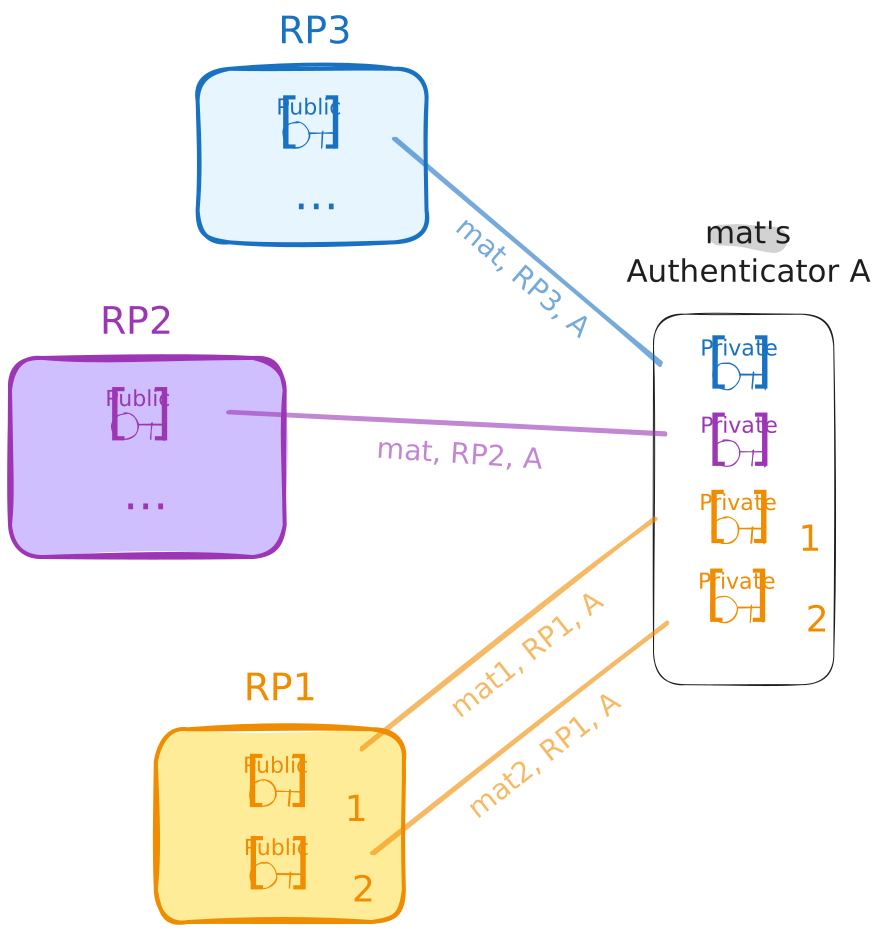
Together, these two bindings mean that an AiTM phishing proxy can intercept the ceremony, relay every message perfectly, and the signature will still fail server-side verification, when redirected to the target RP. The attacker would need to compromise the browser engine itself, at which point they're already past the authentication layer entirely.
Proximity
A passkey proves who you are. It also implicitly asserts where you are: the Authenticator has to be physically accessible to the Client requesting the ceremony.
For platform authenticators (e.g., TouchID, Face ID, Windows Hello), this is trivial since the Authenticator is literally part of the device running the browser. The proximity guarantee is a consequence of the hardware architecture.
For roaming authenticators (e.g., USB security keys, NFC tokens), CTAP2 enforces proximity through the transport layer:
- USB: Physical insertion is required, so no remote exploitation is possible without physical access to the host.
- NFC: Requires holding the key within a few centimeters of the reader. Useful in environments where USB ports are locked down.
- BLE: This short-range wireless option allows for a bit more physical breathing room than NFC, but CTAP2 over BLE still mandates a pairing step to ensure the Authenticator is intentionally connected and remains in the user's immediate vicinity.
The Hybrid flow (also called caBLE: cloud-assisted BLE) is where things get more interesting. This is the "scan a QR code with your phone to authenticate on your laptop" experience, and it falls under the broader umbrella of Cross-Device Authentication (CDA). It works by establishing a CTAP2 tunnel over the internet: the actual CTAP2 messages are routed through a cloud-based relay server, but protected with end-to-end encryption so the relay itself never sees the plaintext. The flow still requires proximity at the initiation step, because the user has to physically scan a QR code displayed on the client device.
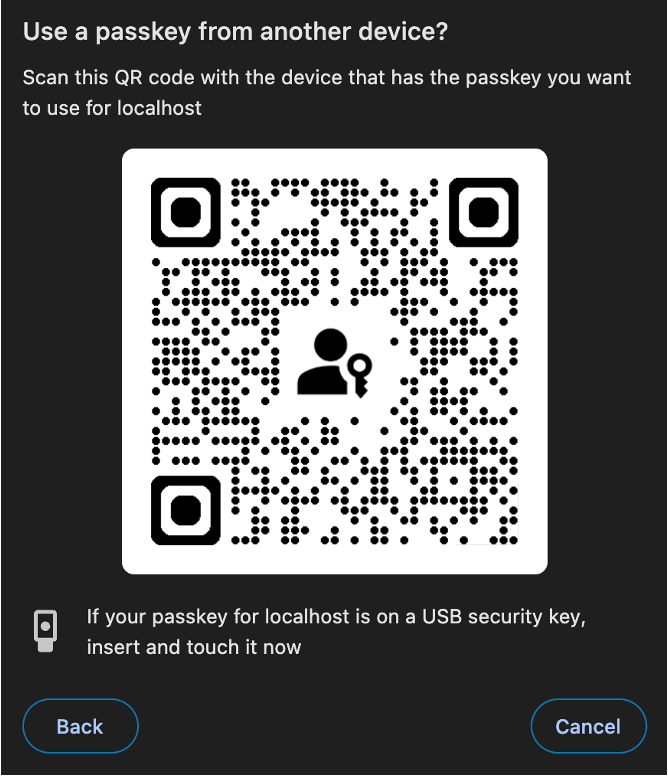
So what's actually inside that QR code? According to the FIDO CTAP 2.2 specification, the QR code encodes a FIDO:/ URI containing a CBOR map with:
- A compressed P-256 public key (33 bytes), used for ECDH key agreement.
- A 16-byte random QR secret, used to derive the tunnel server domain and a pre-shared key.
- The number of known tunnel server domains.
- An optional timestamp, to prevent replay attacks.
- An optional boolean flag, indicating whether the Client supports state-assisted transactions.
The public key authenticates the Client to the Authenticator, while the shared secret authenticates the Authenticator back to the Client. Here is where the proximity check happens since the phone broadcasts a single BLE advertisement that the desktop receives. This phone-to-desktop direction was a specific design choice in caBLEv2 to minimize Bluetooth reliability issues before establishing the internet tunnel.
Stateful caBLE (introduced in caBLEv2, also known as Device Linking, see CTAP 2.2 §11.5) builds on this, with the goal of making the cross-device flow smoother for returning users so they don't have to scan the QR code every single time. During the initial QR-based handshake, the phone sends linking information to the desktop, allowing future connections to be initiated via a network notification instead of a QR scan. A BLE advert is still sent for every transaction to prove proximity, but the desktop no longer needs to display a new QR code. From a security standpoint, the proximity guarantee weakens slightly here since once a device is "linked," the BLE proximity check is the primary gate, and BLE range is measured in meters, not centimeters.
Single-Step Multi-Factor
From an attacker's perspective, a passkey login looks deceptively like single-factor authentication. You click a button, scan your face, and you're in. But under the hood, both factors collapse into a single ceremony.
Traditional MFA stacks discrete factors in sequence: enter your password (something you know), then approve the push notification (something you have), maybe scan your fingerprint (something you are). Each step is a separate protocol exchange, a separate round trip, and a separate point of failure where an adversary can interject.
A passkey collapses this into a single atomic gesture. Both factors are evaluated locally by the Authenticator before any cryptographic assertion is generated:
- Something you have: The private key lives inside the Authenticator (TPM, Secure Enclave, or hardware token). Possessing the hardware implies possessing the credential.
- Something you are (or know): A biometric (or PIN) that the Authenticator checks locally before it will sign the challenge.
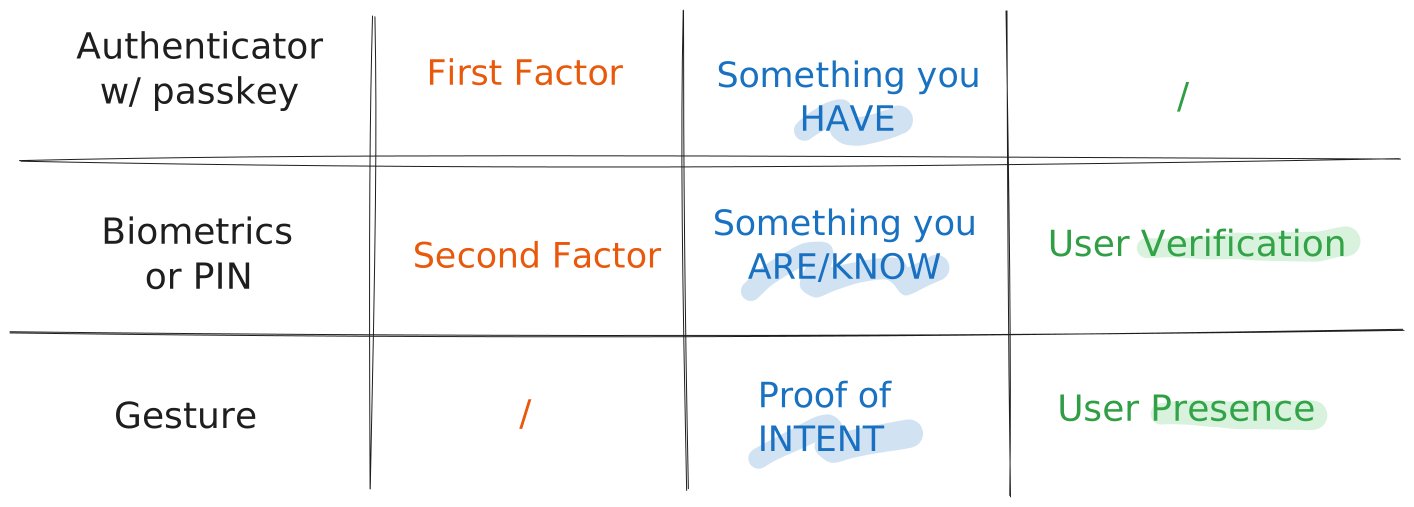
The key takeaway for threat modeling: since both factors are evaluated inside the same Authenticator, in a single step, there is no window between "factor 1 accepted" and "factor 2 presented." Long story short, there is no second factor traveling over a secondary channel to intercept. The single signature is already cryptographic proof of both possession and user verification.
Discoverability (Resident Credentials)
Passkeys, by definition in the current FIDO Alliance terminology, are discoverable credentials, what the earlier specs called "resident keys."
In practical terms, a discoverable credential means the private key material (or a key handle pointing to it) is stored on the Authenticator itself, indexed by RP ID. This enables the "usernameless" login flow: the user visits a website, the browser queries the Authenticator for any credentials matching that RP ID, and presents them via Conditional UI (i.e., AutoFill). The user never has to type a username first.
Under the hood, this works through the mediation: "conditional" option in the navigator.credentials.get() call. When a Relying Party passes this option, the browser quietly polls available authenticators in the background and, if matching credentials exist, surfaces them in the AutoFill dropdown alongside saved passwords.

There are practical limits. Hardware security keys have finite storage for resident credentials. YubiKey 5 series keys ship with 25 resident key slots (firmware 5.7 bumped this to 100, but that's still a ceiling). Once those slots are full, the Authenticator throws a hard error. Indeed, early adopters who registered passkeys everywhere eventually hit a wall where registrations mysteriously fail until they manually purge old FIDO2 credentials.
Platform authenticators (iCloud Keychain, Google Password Manager, Windows Hello) don't have this storage limitation because they store credentials in software-managed keystores. But this convenience is precisely what introduces the synced passkey question we'll address next.
Types of Passkeys: Device-Bound vs. Synced
This is where the term "passkey" gets a little fuzzy, and frankly, where the threat model completely shifts.
Technically speaking, a passkey is nothing more than a discoverable FIDO2 credential. But everything changes depending on where that private key actually lives.
Device-Bound Passkeys
The private key is generated inside a hardware security module, a TPM chip, the Secure Enclave on Apple devices, or the secure element on a YubiKey. It cannot be exported, be backed up, leave that silicon. If you lose the device, you lose the credential.
This is the original FIDO2 model, where the threat model boils down to physical access to the device. Because there are no cloud accounts to compromise and no sync infrastructure handling key material, the private key exists exclusively in one piece of hardware.
While this strict lack of backup capability is notoriously painful for average consumers who drop their keys in a storm drain and find themselves locked out of dozens of accounts, it is exactly what makes device-bound keys the gold standard for enterprise environments. A company can definitively map a credential to a specific physical asset they issued, and if an employee loses their key, an IT administrator can securely revoke it and issue a temporary bypass token to restore access without compromising the entire authentication architecture. Does that ring a bell?
Synced Passkeys
This is the model that achieved mass adoption by making a deliberate security trade-off.
When you create a passkey on an iPhone, the private key doesn't stay exclusively in the Secure Enclave. It gets wrapped, encrypted, and synced to iCloud Keychain. This means it becomes available on your MacBook, your iPad, and crucially on any new device that signs into your iCloud account. Google Password Manager does the same thing on Android, and third-party password managers like 1Password, Bitwarden, and Dashlane have followed suit.
The benefits for the average user are obvious since there is no more single-device lock-in and no recovery crisis when you switch phones. They just sign into their cloud account and their passkeys are there waiting for them.
The definition of a "passkey" as a fully synced credential is still somewhat aspirational due to ecosystem fragmentation. While third-party password managers are bridging the gaps, Windows Hello credentials currently don't sync at all (though this is finally shifting in early 2026 as Microsoft Entra ID rolls out native support for synced passkeys and granular passkeyType policies), Google Password Manager only syncs between Android devices, and iCloud Keychain is strictly for the Apple ecosystem. In many cases, a credential marketed to the user as a "passkey" might not actually be backed up anywhere yet.
Cross-provider portability has been the longest-standing gap for synced passkeys, and FIDO is closing it with the Credential Exchange Protocol (CXP) and Credential Exchange Format (CXF). CXP defines the migration handshake between an Exporting Provider, an Importing Provider, and an optional Authorizing Party, with the user authorizing the move via OS biometry. The credential bundle is encrypted with HPKE (RFC 9180) over an ephemeral Diffie-Hellman key and packaged as a ZIP of JWE files. CXF isn't just for passkeys as also passwords, TOTP seeds, SSH keys, credit cards, and Wi-Fi credentials all use the same format. The migration is point-in-time: once a credential moves to the new provider, the two sides keep separate copies and don't stay in sync. The spec is deliberately transport-agnostic, and the only production transport today is Apple's local IPC over XPC (ASCredentialExportManager / ASCredentialImportManager), which means the payload doesn't touch the network and Burp can't see it.
CXF reached Proposed Standard in August 2025 and CXP is still a Working Draft, but Apple already shipped support in iOS / macOS 26 in September 2025, with Bitwarden, 1Password, Dashlane, and Vault12 Guard following on iOS shortly after. Drafts and feedback live in the FIDO Alliance's credential-exchange-feedback repo, and Bitwarden's MIT-licensed Rust reference implementation (with a 1Password fork) is the most useful place to read the format end-to-end. The trust model is new, the HPKE handshake is new, and no one has cross-audited the vendor implementations yet. No public offensive tooling, and no CVEs filed, so basically the clock just started.
But as you might guess, when syncing does happen, the security implications are significant.
The threat model shifts from endpoint to cloud. Instead of attacking the device directly, an attacker who compromises the user's Apple ID, Google account, or password manager vault inherits every synced passkey in that account. This isn't theoretical. As a concrete example, Prove has documented cases where attackers combine SIM swapping with cloud account takeover to sync a victim's entire keychain (passkeys included) to an attacker-controlled device. From the cloud provider's perspective, the attacker's device looks legitimate since it passed the account login and the 2FA check, so the system dutifully syncs everything.
Nothing "breaks" on the victim's end. Their devices continue working normally and the cloud continues syncing normally. It's just that now it is syncing to an additional, unauthorized device.
You can detect this at the protocol level. Remember those BE and BS flags in the authData flags byte? A Relying Party that checks BE=1 knows the credential is sync-eligible. A server that enforces BE=0 (backup-not-eligible) can reject synced passkeys entirely and mandate hardware-bound credentials. For high-value targets like administrators, developers, or anyone whose access could be catastrophic if compromised, this is the right policy. That said, bear in mind that those flags can be spoofed.
From a pentesting perspective, evaluating how a target handles the BE/BS flags is a concrete test case. Does the application even inspect them? Does it differentiate risk levels based on credential backup state? Most deployments we've seen in the wild do not, and that is a finding worth reporting.
Types of Authenticators
Now that we've covered where the key lives, let's look at what creates it. Authenticators break down into three categories, each with different security properties and attack surfaces.
Platform Authenticators
These are built into the device itself. Apple's Secure Enclave (iPhones, Macs), Android's Trusted Execution Environment (TEE), and Windows Hello's TPM integration all fall into this category. The key generation happens in hardware-isolated memory, and user verification is typically biometric (Touch ID, Face ID) or a device PIN.
From a security standpoint, platform authenticators benefit from the OS vendor's investment in secure boot chains and tamper-resistant hardware. But on the flip side, they're tied to the platform vendor's ecosystem, and when they support syncing (as iCloud Keychain and Google Password Manager do), they become synced passkeys with the cloud-based threat model described above.
Roaming Authenticators (Security Keys)
USB, NFC, or BLE devices that physically connect to the Client. YubiKeys are the canonical example, but there's a growing market of FIDO2-certified keys from SoloKeys, Google (Titan), Feitian, and others.
These are the gold standard for device-bound credentials. The private key is generated inside the key's secure element and is non-exportable by design. User verification is typically a physical touch (UP flag) or an on-device PIN (UV flag). Some newer keys support biometric verification (fingerprint readers built into the key itself).
The practical limitation is the resident key storage we mentioned: finite slots, no user-friendly way to audit which credentials are stored, and a factory reset is most of the time the only way to reclaim slots if the key is full.
Hybrid / Cross-Device Authenticators
This is the QR-code-scan-your-phone-to-login flow. Architecturally, your phone acts as a roaming authenticator that connects to the Client (e.g., your laptop's browser) via a CTAP2 tunnel over the internet, bootstrapped by a BLE proximity check and a scanned QR code. We covered the details of this flow in the Proximity section above.
Whether the resulting credential is device-bound or synced depends entirely on the phone's authenticator implementation. If your phone uses iCloud Keychain, the passkey created via hybrid flow is a synced passkey. If your phone uses a hardware-bound implementation, it's device-bound.
Honorable Mentions: Quirks and Edge Cases
In the wild, standard specifications inevitably collide with practical constraints. Beyond the textbook FIDO2 flows, there are architectural nuances around fallback mechanisms, hardware workarounds, and state management that appear frequently in real-world deployments and carry massive implications for offensive security. Here are three of the most common ones:
Magic Links: A Pragmatic Hybrid (and Its Threat Model)
Let's talk about an alternative that often goes hand-in-hand with this discussion: Magic Links. Rather than forcing a user to remember a complex password, you strip it down to the basics. You provide your email, the site sends a unique, tokenized URL, you click it, and you are logged in. This effectively turns your email inbox into your authenticator.

This approach bets on a few observations about how users actually behave. First, almost all online accounts can eventually be signed into by proving possession of an email address (i.e., the classic "forgot password" flow). Second, people who struggle with password managers often abuse the "forgot password" flow as their primary login method anyway. Why shouldn't we just make that the default experience? Finally, if you don't store passwords, you eliminate credential stuffing completely.
A pattern that's picked up traction is layering passkeys on top of this. Filippo Valsorda and Ricky Mondello have argued that combining magic links with passkeys solves portability objections, matches the speed of password managers, and keeps the UX clean.
The flow works like this:
- First visit: User enters their email, receives a magic link, clicks it, and is authenticated.
- Immediate enrollment: The site prompts the user to create a passkey to ease their next login attempts.
- Return visits (same device): User authenticates via passkey, single tap, biometric, done. Conditional UI makes this appear as a simple AutoFill suggestion.
- New device / Lost key: The system falls back to the magic link to grant access, then prompts passkey registration again.
It's elegant because it solves the "Device-Bound key lockout" fear without requiring a convoluted recovery mechanism. Indeed, there is no password to reset because there was never a password to begin with.
But from an offensive perspective, this pattern has a specific implication: email becomes the master key.
In a traditional password-based system, compromising an email account gives you password reset capability, which is already devastating. But in a magic-link-plus-passkey system, compromising the email account gives you direct login capability to every service that uses that email for magic links, plus the ability to enroll your own passkeys on your own device.
The fact that the system supports multiple passkeys per account (a usability feature) means your attacker-enrolled passkey coexists silently alongside the victim's legitimate ones. And since there's typically no notification to the user about new passkey enrollment, the persistence can go undetected.
There's also an interesting social engineering angle. Mondello's post discusses the in-app browser problem: when a user opens a magic link from within a mail app (like Gmail on iOS), it loads in the app's embedded browser, not the system browser. Passkeys created in the in-app browser context may not be accessible from Safari, creating user confusion. For an attacker, this UX friction is an opportunity in that confused users are more likely to click on "helpful" phishing emails offering to "fix" their login issues.
Any system is only as strong as its weakest recovery path. If passkeys provide phishing-resistant authentication but the fallback is a magic link sent to an email account protected by a password and SMS-based 2FA, the attacker will just target the email layer. Your weakest authentication method defines your real security posture.
Key Wrapping
One of the persistent challenges with hardware security keys is strictly finite storage. If a device only has 10KB of memory available, how can it support hundreds of passkeys?
The engineering workaround for this is a mechanism known as key wrapping (resulting in what the specification calls a non-discoverable credential). Instead of permanently storing the private key inside the device's secure enclave, the Authenticator offloads it. It generates the required keypair, encrypts the private key using an internal Master Key burned into the hardware, and hands this encrypted blob (i.e., the credentialId or Key Handle) to the Relying Party (RP) to store on its behalf.
During an authentication ceremony, the server hands this encrypted blob back to the Client. The hardware key decrypts it on the fly, signs the challenge, and discards the private key from memory.
This works well for usability and scaling, but it introduces a vulnerability to device cloning. The master key is typically unique to the device itself, but if an attacker manages to extract it, they can create a virtual authenticator. In a targeted supply-chain scenario, an attacker could extract the master key, give the physical hardware token to a victim, and wait for them to register it. The attacker now holds a software clone of the Authenticator.
The Signature Counter
To mitigate cloning attacks against wrapped keys, the WebAuthn specification includes a state management defense: the Signature Counter (i.e., signCount). Both the physical Authenticator and the Relying Party maintain an integer that increments with every successful authentication ceremony.
It's basically a rudimentary anti-cloning mechanism. If an attacker operates a cloned key and submits an assertion, their counter will eventually diverge from the victim's hardware key. When the server sees an incoming signCount that is less than or equal to the last known value, it (should, at least) flags a potential cloning incident and terminates the authentication.
The first thing to know is that signature counters are optional. If an Authenticator doesn't implement them, the value in the response is simply always zero. Most hardware security keys do implement them, but as Adam Langley notes, they are not implemented in an increasing fraction of cases because signature counters are fundamentally incompatible with synced passkeys. If a private key is synced across multiple devices, keeping a coherent, strictly-increasing counter across all of them becomes an unsolvable synchronization problem. Since synced passkeys are the direction the ecosystem is heading, the signature counter is slowly becoming a relic of the hardware-only era.
There is also a privacy angle worth flagging. Many security keys maintain a single, global counter shared across all credentials rather than one per credential. This means that different websites can observe the current counter value and its rate of increase, effectively correlating use of the same physical key across unrelated services, a subtle fingerprinting vector.
Even when counters are implemented and checked, the practical reality is underwhelming. Most server implementations treat a counter mismatch as a generic, transient authentication failure. The user (or attacker) simply retries, the counter naturally increments past the conflict, and the login succeeds. The user starts to believe their security key is "a bit worn out" and occasionally needs a second tap. The cloning detection, in practice, goes unnoticed.
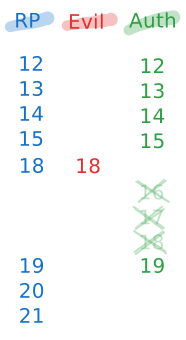
From an offensive perspective, the specification's language contains a further structural loophole: the incoming counter must be strictly greater than the stored value, but the spec does not explicitly mandate how much greater it is allowed to be.
This oversight enables a fast-forwarding attack. Once an attacker commands a cloned virtual authenticator, they can artificially inflate their signCount to a massive number (say, 10000). Assuming the server's last recorded value was 15, it accepts 10000 because it mathematically satisfies the "strictly greater than" requirement.
The payload of this attack drops when the victim attempts to log in with their legitimate physical key, which transmits a counter of 16. The server, now expecting a counter strictly greater than 10000, permanently rejects the victim's request. The attacker has successfully weaponized the anti-cloning mechanism to achieve a targeted Denial of Service (DoS) against the legitimate user, while maintaining their own persistent access. This highlights why Relying Parties must validate not just that counters increment, but that they don't jump inexplicably high.
Wrapping up
Let's bring this back to reality. Understanding the pros and cons of passkeys directly shapes where you'll spend your time on a real engagement. The "Pros" split two ways: some drastically improve user experience without automatically increasing security, while others are the cryptographic brick walls that force us to stop kicking the front door and look for other weak links in the chain. The "Cons" expose the structural weaknesses we can actually exploit: trust boundaries, forced fallbacks, and ecosystem lock-ins.
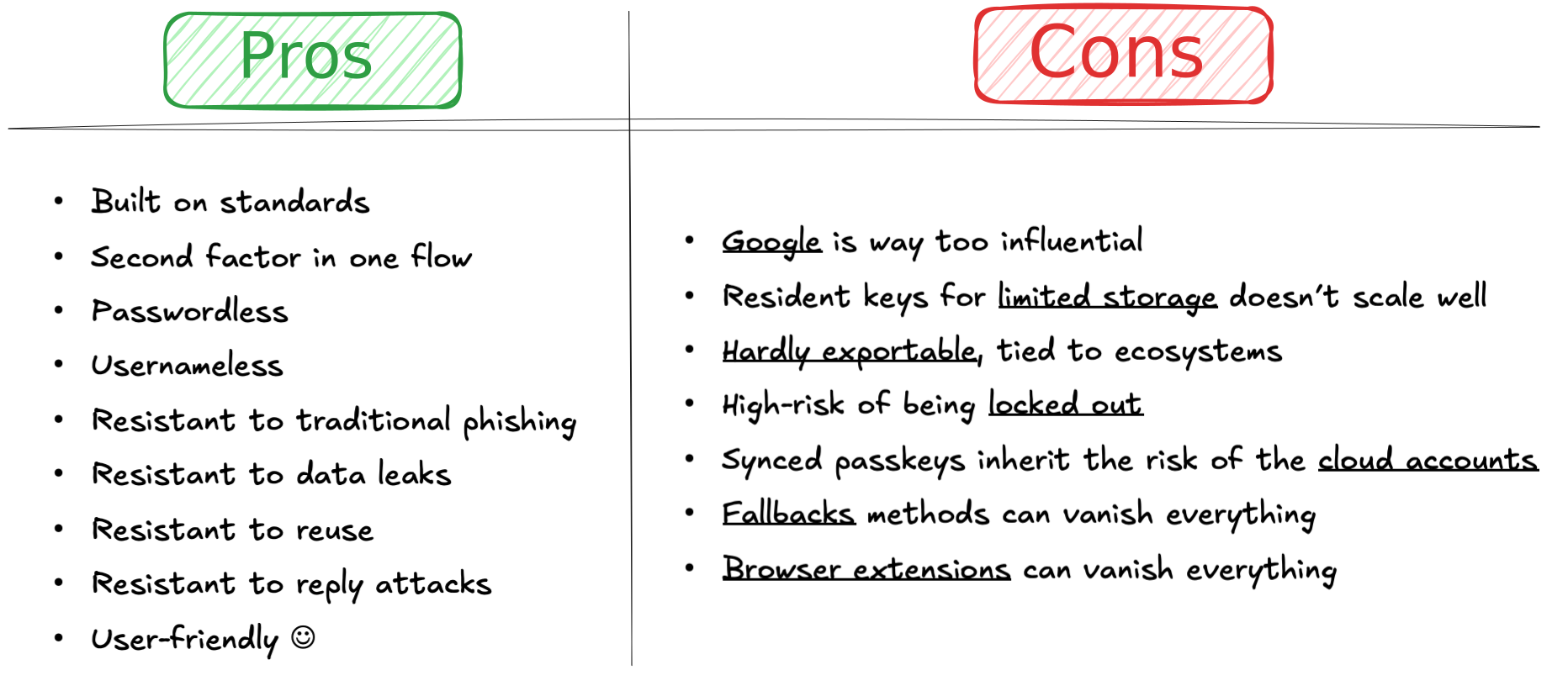
These are the protocol strengths (the "Pros"), where some of them negate or mitigate traditional attack techniques:
| Property | Impact |
|---|---|
| Origin binding | Credential stuffing is dead with passkeys. AiTM phishing proxies (e.g., Evilginx, Modlishka) can relay every byte perfectly and the signature will still fail server-side. As we saw, the credential is cryptographically welded to the domain. |
| No shared secrets on the server | The server stores only the public key. Breaching the credential database yields nothing replayable. No password hashes to crack, no TOTP seeds to steal. |
| Phishing resistance | The browser enforces the origin binding, not the user. Social engineering the user into "typing their passkey" isn't a thing: there's nothing to type. |
| Passwordless, Usernameless & User-Friendly | By removing the cognitive load of passwords and usernames, users default to the secure path via biometrics or device PINs (e.g., Face ID, Touch ID). Frictionless UX means less chance they will abandon the flow for a weaker, exploitable fallback. |
| Single-step MFA | There's no "intercept the second factor" window. Both possession and verification happen atomically inside the Authenticator. No OTP to intercept via SIM swap, no push notification to "fatigue-bomb". |
| Replay protection | Every assertion is bound to a fresh challenge (nonce). Captured authentication traffic cannot be replayed. |
| Sign count | The server can optionally track signCount and flag cloned authenticators if the count goes backward. (In practice, many servers don't enforce this, but the mechanism exists.) |
On the flip side, these are the implementation gaps and structural vulnerabilities (the "Cons") where attackers mostly pivot to:
| Vulnerability / Weak Link | Description |
|---|---|
| Big Tech influence | As William Brown, among others, pointed out, the ecosystem is heavily steered by titans like Google and Apple. Their UX choices often override standardized security principles. |
| Limited resident key storage | Hardware keys have finite slots for discoverable credentials (often between 25 and 100). This simply does not scale for a user with hundreds of accounts, pushing them toward less secure fallback methods. |
| Ecosystem lock-in | Device-bound passkeys are, by definition, hardly exportable. If you lose your Apple device and move to Android, you leave your cryptographic identity behind. |
| High risk of being locked out | The flip side of "unphishable" is "unrecoverable." If a user loses their sole hardware authenticator and the RP has no fallback, the account is permanently inaccessible. |
| Cloud account inheritance | Synced passkeys solve the lockout problem but inherit the risk profile of the cloud account holding them (e.g., iCloud, Google). SIM swap → cloud account takeover → passkey sync. This is why attackers often target the recovery loop. |
| Fallback methods vanish security | If an RP offers SMS OTP or magic links alongside passkeys, an attacker will just force a downgrade or target the email inbox. The weakest link defines the actual security posture. |
| Browser extensions as man-in-the-middle | Researchers have repeatedly demonstrated that compromised or malicious browser extensions can intercept WebAuthn API calls, hijack DOM elements, or bypass the login process entirely. |
| Help desk social engineering | Because device lock-in creates recovery panics, users will call the help desk, if any. Without strong identity proofing, an attacker can social-engineer their way into enrolling a new rogue credential. |
| Attestation blind spots | Most deployments don't verify attestation or check the BE/BS flags. If a server blindly accepts any credential, all the physical guarantees of hardware-bound keys evaporate. |
| Session token theft (post-auth) | Passkeys protect the authentication ceremony, not the session. If the RP issues a standard bearer cookie after a successful passkey auth, stealing that cookie (via XSS or infostealers) gives you the session without ever touching the passkey. |
(Note: We will explore all of these vectors in exhaustive detail, along with tools to exploit them, in the next blogpost, Demystifying Passkeys: Under Attack.)
Conclusion
Passkeys signify a real shift in how authentication works. Whole classes of attacks we took for granted just stop working against them. Credential stuffing, the bread-and-butter attack that has powered account takeover at an industrial scale for over a decade, simply doesn't work against passkeys. Traditional AiTM phishing, the attack that made Evilginx a household name in our community, hits a cryptographic wall. And the MFA fatigue attacks that plagued push-notification-based systems? There's no notification to fatigue-bomb.
But passkeys aren't unhackable. Nothing is. What they do is shift the required sophistication from "buy a $10 phishing kit on Telegram" to "compromise a cloud account" or "hijack a post-authentication session token" or "find a downgrade path to a weaker method." The attack surface hasn't disappeared, but simply it has migrated. And wherever the attack surface moves, we follow!
For Relying Parties: check your attestation. Inspect the BE/BS flags. Don't offer fallback methods unless you've accepted the risk they introduce. Above all else, don't assume that a successful passkey authentication means you can issue a long-lived bearer cookie with no further verification.
In the next blogpost, Demystifying Passkeys: Under Attack, we stop admiring the architecture and start breaking it. We'll walk through the current state of passkey pentesting, implementation flaws we've seen in the wild, and how to use tools like Burp Suite to intercept and manipulate these ceremonies. We'll also look at the emerging research around passkey-specific attack tooling and how the defensive recommendations hold up when we actually start poking at them.
Until then, go look at your last pentest report. If the client had passkeys deployed: did you check the flags byte? Did you test for downgrade paths? Did you verify attestation was being enforced? If the answer is no, you've got homework.
References
- W3C Web Authentication (WebAuthn) Level 3 Specification
- FIDO Alliance CTAP 2.2 Specification
- W3C Credential Management Level 1: Conditional Mediation
- Yubico: How Many Accounts Can I Register My YubiKey With
- Yubico: YubiKey Bio Series
- Adam Langley: A Tour of WebAuthn
- Firstyear (William Brown): Passkeys: A Shattered Dream
- Ricky Mondello: Magic Links Have Rough Edges, but Passkeys Can Smooth Them Over
- Corbado: WebAuthn Conditional UI / Passkeys Autofill
- Proofpoint: Don't Phish, Let Me Down: FIDO Authentication Downgrade
- Prove: Passkey Syncing Fraud: The New Attack Vector Everyone Saw Coming
- SquareX: Passkey Login Bypassed via WebAuthn Process Manipulation
About the Author
 Matteo Giordano is a Security Engineer at Anvil Secure, focused on offensive engagements across AppSec and NetSec, with a recent specialty in AI Red Teaming and GenAI security.
He came into security from kernel-side development at rev.ng Labs, where he worked on a next-generation decompiler.