

By Matteo Giordano
A three-part series on passkeys for security engineers and offensive security specialists. You are reading the first blogpost.
- Under the Hood: The Protocol. How passkey ceremonies work at the byte level.
- Under the Hood: The Architecture. Distinctive features, taxonomies, and deployment edge cases.
- Under Attack. Pentesting the passkey Chain of Trust.
TL;DR
At its core, a passkey is standard asymmetric cryptography wrapped around a biometric prompt. For security engineers tasked with testing or integrating them, though, the details often stay opaque.
This is the first post in a three-part series that puts most of what a security engineer needs in one place. Here, we walk through the protocol stack (WebAuthn and CTAP2), the registration and authentication ceremonies, and the raw data structures that fly across the wire. The second blogpost builds on these foundations to cover architecture and deployment edge cases, while the third blogpost is the offensive companion.
If you want to know what actually happens when you touch that fingerprint sensor, let's pop the hood.
Passkeys in Context
Passkeys are a rigorous implementation of standard Public Key Infrastructure (PKI), specifically the FIDO2 standard, orchestrated through a browser API known as WebAuthn. There are three participants in every exchange: a Relying Party (the server), a Client (the browser or OS), and an Authenticator (your device, or a hardware key). They perform a well-defined cryptographic ceremony together. None of the cryptographic primitives are new, what changes is how they get bound together.
Adoption is already at scale. In less than a year since Google enabled passkeys for Google Accounts, users authenticated with passkeys over 1 billion times across 400+ million accounts. Early adopters like PayPal, eBay, and Uber have been joined by Amazon, DocuSign, Shopify, Kayak, WhatsApp, and others. Password managers now support storing passkeys as well, putting them inside the same tools users already lean on.
So what does a passkey actually bring to the table?
- Origin-bound: the credential is mathematically tied to the legitimate domain, meaning a pixel-perfect fake website simply cannot use it (more on exactly how this works later).
- No shared secrets: the server never stores a password or symmetric key; only a public key sits on the server side, which effectively eliminates the risk of credential leaks and password reuse attacks.
- Single-step multi-factor: logging in is often just a biometric prompt, no context-switching to an email app, no fumbling with an authenticator, no "your verification code is 847291."
- Hardware we already own: there's no need to provision smart cards or separate tokens. The cryptographic modules required for passkeys are already baked into the phones and laptops people carry every day.
- Phishing-resistant: by design, not by policy.
Understanding what a defense actually does is the first step toward finding what it doesn't. The rest of this post digs into the protocol stack, the registration and authentication ceremonies, and the raw CBOR data structures that make passkeys work on the wire.
The Stack: FIDO2
To take this first step, we need to clear up the terminology soup. You'll hear "WebAuthn," "FIDO2," and "CTAP" thrown around as if they were synonyms, but the distinction matters because the attack surface differs at each layer.
Think of FIDO2 as the umbrella. Underneath it, the protocol splits into two distinct conversations:
-
WebAuthn (Web Authentication API): The standardized browser API that allows the Relying Party (RP, i.e., the web server) to talk to the Client (the browser). This is where the JavaScript lives. Specifically, the RP triggers
navigator.credentials.create()to initiate a registration flow, andnavigator.credentials.get()to initiate an authentication flow. This is the layer where interception work usually starts (e.g., using Burp Suite or Caido). - CTAP2 (Client-to-Authenticator Protocol): How the Client (browser/OS) talks to the Authenticator (the roaming USB key or the platform module on another device like TouchID). This happens over USB, NFC, or BLE, and the messages are encoded in CBOR (Concise Binary Object Representation).
When you trigger a passkey login, the browser acts as a broker. On a high level, it takes the request from the website via WebAuthn, translates it into CBOR commands, and fires them over CTAP2 to the authenticator hardware. The response travels back through the same layers: CBOR out of the Authenticator, JSON back to the server.
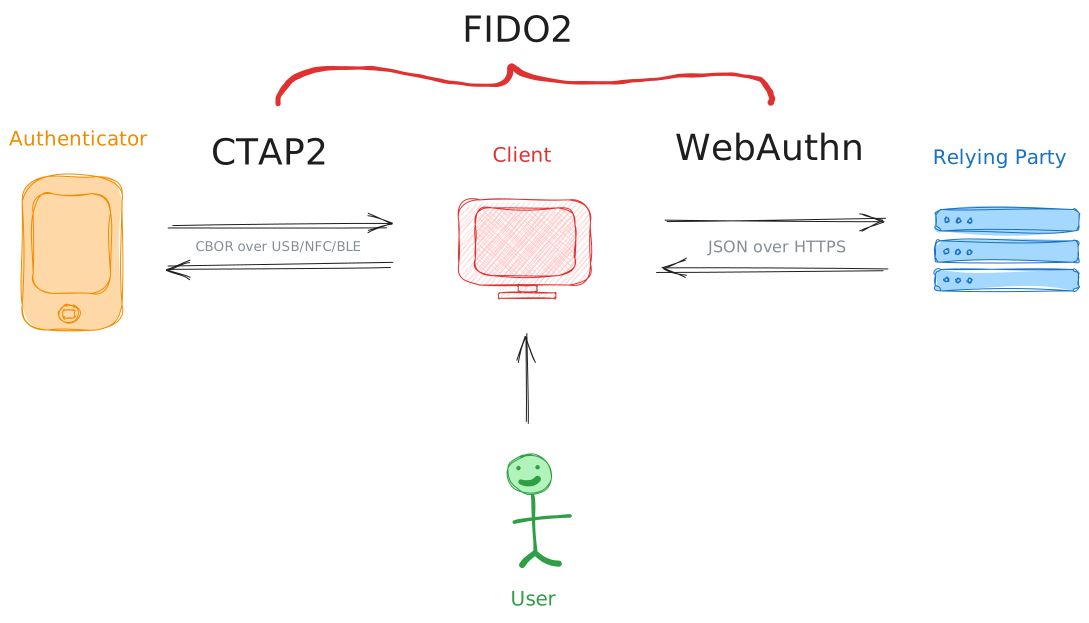
Note that HTTPS is non-negotiable here: WebAuthn will flat-out refuse to operate on a plaintext HTTP origin because the spec mandates it and browsers enforce it, so that's one less thing for us to try to downgrade.
Ceremonies
In the FIDO world, protocol exchanges are called ceremonies, a term borrowed from academic security literature to emphasize that the human participant is part of the protocol, not just the software. Let's break down the two that matter: Registration and Authentication.
Registration (navigator.credentials.create)
Registration is the overall process of creating a new passwordless credential. It involves generating a cryptographic key pair and linking the user's Authenticator to the server. Within this process is attestation: a security verification step that provides cryptographic proof to the server about the Authenticator's make, model, and integrity, ensuring it is a genuine and trusted device.
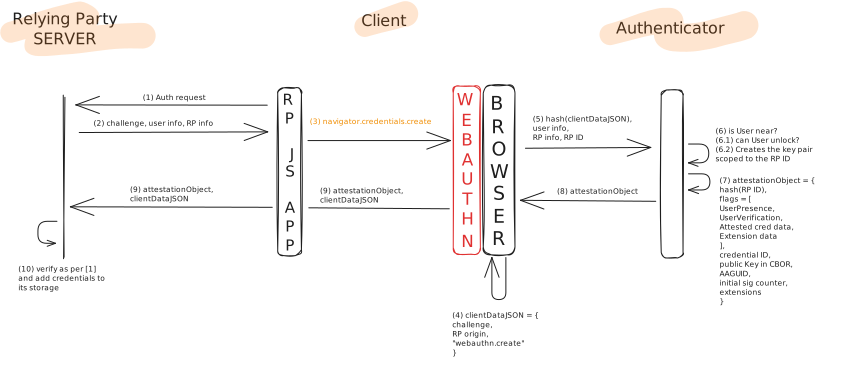
It all starts with the Client. When a user decides to register a passkey, the browser (Client) makes an initial request to the server. The Relying Party responds by generating a challenge and sending back a PublicKeyCredentialCreationOptions object. This configuration tells the browser which cryptographic algorithms the server is willing to accept (e.g., "I only trust ES256"), provides the challenge (a random nonce to prevent replay attacks), and includes identifiers like the RP ID and user information.
The following diagram illustrates the full registration flow end-to-end:
As an attacker intercepting the traffic (e.g., using Burp Suite), this is what the actual JSON structure sent from the server looks like (using a real payload from passkeys-debugger.io):
{
    "publicKey": {
        // "direct" means we want the actual authenticator model/integrity data, not just "none"
        "attestation": "direct",
        "authenticatorSelection": {
            "residentKey": "preferred",
            "userVerification": "required",
            "authenticatorAttachment": "platform",
            "requireResidentKey": false
        },
        // The nonce we must sign to prevent replay attacks
        "challenge": "Rrsaa7zIS-gICmZn3LbD7URaUO-58M0mo7bNYgKl-BA",
        "rp": {
            "name": "Relying Party Name",
            // The origin binding starts here
            "id": "www.passkeys-debugger.io"
        },
        "user": {
            "name": "anvil-user",
            "displayName": "anvil-user",
            "id": "LFyre4RHSLprCSRuOwEyEvLvsBuCt-MKAN7QBjISlNs"
        },
        "timeout": 60000,
        "pubKeyCredParams": [
            {
                "alg": -8,
                "type": "public-key"
            },
            {
                "alg": -7,
                "type": "public-key"
            },
            {
                "alg": -257,
                "type": "public-key"
            }
        ]
    }
}
When this configuration is passed into navigator.credentials.create(), the Client does two things before talking to the Authenticator. First, it assembles the clientDataJSON object, which bundles the challenge, the true origin of the Relying Party (written by the browser engine, not by JavaScript, making it unforgeable), and the ceremony type ("webauthn.create"). Then, it hashes this clientDataJSON with SHA-256 and sends the hash (not the raw object) to the Authenticator over CTAP2, along with the user and RP information.
The Authenticator then verifies user proximity (via BLE, NFC, or a physical touch) and, if required by the RP, user verification (PIN, biometric, or pattern). Once confirmed, it generates a brand-new asymmetric key pair scoped to the RP ID. The private key stays locked inside the secure hardware (or gets synced, more on that later). The Authenticator wraps everything into an attestationObject and returns it to the Client.
The Client then forwards both the attestationObject and the original clientDataJSON back to the Relying Party, which verifies the data according to the WebAuthn specification and, if everything checks out, stores the credential.
The data returned by the browser is a PublicKeyCredential object. While the outer shell is standard JSON/JavaScript properties, the core payload inside response.attestationObject is actually a binary CBOR blob. When intercepted and fully decoded (as seen through our debugger), here is the complete reality of the credential data returned from the Authenticator:
{
  // Tells us where the key lives:
  // * platform = inside the device
  // * cross-platform = roaming key
  "authenticatorAttachment": "platform",
  "id": "MUr0XtSb_EOfcJuQ-zPHSAl9XbxEfXNr4ATHwnMY69s",
  "rawId": "MUr0XtSb_EOfcJuQ-zPHSAl9XbxEfXNr4ATHwnMY69s",
  "response": {
    "attestationObject": {
      "fmt": "packed",
      "attStmt": {
        "alg": "ES256 (-7)",
        // The cryptographic proof of the authenticator's integrity
        "sig": "MEUCIQCveOj0QQHXeB0PlDAaIJK1US-XEE7oVVBPGVky4ak2lQIgPGsQRl40geGWTUdeJI2WXGiA0apAXckVi2b3tZYYO8U"
      },
      // The critical authenticator data, parsed point by point below
      "authData": {
        // Hash of our domain, proving the origin binding
        "rpIdHash": "PpZrl-Wqt-OFfBpyy2SraN1m7LT0GZORwGA7-6ujYkM",
        "flags": {
          "userPresent": true,
          "userVerified": true,
          "backupEligible": false,
          "backupStatus": false,
          "attestedData": true,
          "extensionData": false
        },
        "counter": 0,
        "aaguid": {
          "raw": "b5397666-4885-aa6b-cebf-e52262a439a2",
          // The exact make/model of the authenticator
          "name": "Chromium Browser"
        },
        "credentialID": "MUr0XtSb_EOfcJuQ-zPHSAl9XbxEfXNr4ATHwnMY69s",
        "credentialPublicKey": "pQECAyYgASFYIOa_7zBdv0lmq6c57_sUuFtiUS5qcgDrKYYLsPiCBy8LIlggJdpXN05FeQozQAbBF_sodqtW20q4UR7ygsN_XywYvKE",
        // The newly generated public key matching the server's accepted algorithms
        "parsedCredentialPublicKey": {
          "keyType": "EC2 (2)",
          "algorithm": "ES256 (-7)",
          "curve": 1,
          "x": "5r_vMF2_SWarpznv-xS4W2JRLmpyAOsphguw-IIHLws",
          "y": "JdpXN05FeQozQAbBF_sodqtW20q4UR7ygsN_XywYvKE"
        }
      }
    },
    // The anti-phishing mechanism in plain sight
    "clientDataJSON": {
      "type": "webauthn.create",
      "challenge": "Rrsaa7zIS-gICmZn3LbD7URaUO-58M0mo7bNYgKl-BA",
      // True origin written by the browser engine, unforgeable by JS
      "origin": "https://www.passkeys-debugger.io",
      "crossOrigin": false
    },
    "transports": [
      "internal"
    ],
    "authenticatorData": "PpZrl-Wqt-OFfBpyy2SraN1m7LT0GZORwGA7-6ujYkNFAAAAALU5dmZIhaprzr_lImKkOaIAIDFK9F7Um_xDn3CbkPszx0gJfV28RH1za-AEx8JzGOvbpQECAyYgASFYIOa_7zBdv0lmq6c57_sUuFtiUS5qcgDrKYYLsPiCBy8LIlggJdpXN05FeQozQAbBF_sodqtW20q4UR7ygsN_XywYvKE",
    "publicKey": "MFkwEwYHKoZIzj0CAQYIKoZIzj0DAQcDQgAE5r_vMF2_SWarpznv-xS4W2JRLmpyAOsphguw-IIHLwsl2lc3TkV5CjNABsEX-yh2q1bbSrhRHvKCw39fLBi8oQ",
    "publicKeyAlgorithm": -7
  },
  "type": "public-key",
  "clientExtensionResults": {}
}
These nested structures define the attestation, which is the Authenticator's way of proving to the server: "I am a legitimate piece of hardware, not a software emulator trying to clone a key."
To do this, the Authenticator provides an attestation statement (attStmt) in a specific format (fmt).
The fmt field tells you how that proof is constructed. A value of "packed" is the most common for platform authenticators and modern security keys. You'll also encounter "tpm" for Windows machines using their TPM chip, or "android-key" on Android devices. Alternatively, "none" means the Authenticator declined to provide attestation. This is great for user privacy, but it means the server (and you, the attacker) loses the ability to verify the specific make and model of the Authenticator.
The attStmt object contains the actual proof. Usually, this means a signature verifying that the credential was generated by a genuine manufacturer's chip. The alg value (e.g., -7) maps to ES256 (ECDSA with P-256 and SHA-256) in the COSE algorithm registry. When present, the x5c array carries the attestation certificate chain that a server can validate against known root CAs from vendors like Yubico or Apple.
The following diagram (from the W3C WebAuthn specification) shows how all of these pieces fit together inside the attestationObject:
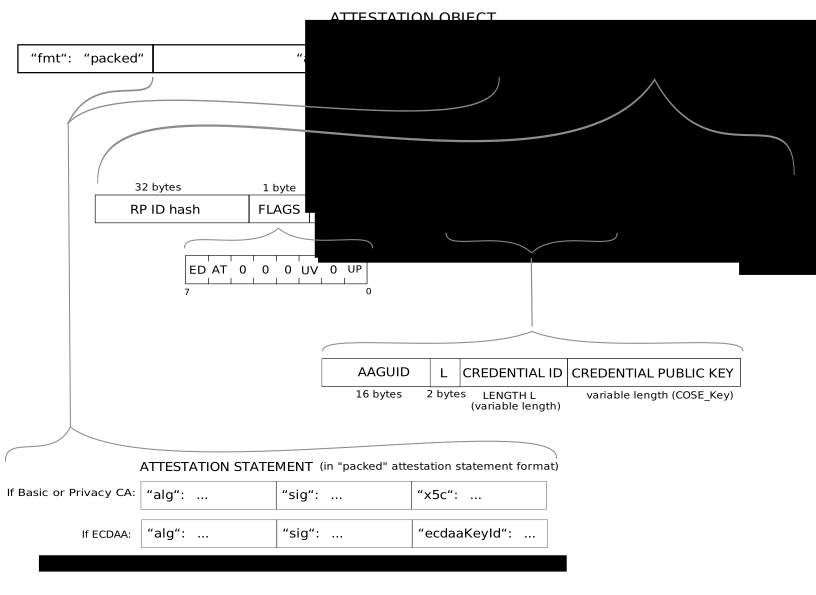
But the real payload is authData. This is a byte array with a precisely defined structure, and parsing it is where we get our hands dirty.
The authData Structure
The authData field is a concatenated byte string with the following layout:
| Offset | Length | Field | Description |
|---|---|---|---|
| 0 | 32 | rpIdHash |
SHA-256 hash of the RP ID (e.g., google.com). This is the origin binding at the byte level. |
| 32 | 1 | flags |
Bit field encoding user presence, user verification, backup state, and more (see breakdown below). |
| 33 | 4 | counter |
Big-endian uint32. Incremented on each use; servers can use this to detect cloned authenticators. |
| 37 | 16 | aaguid |
Authenticator make/model identifier. Lets the server know exactly what hardware generated the key. |
| 53 | 2 | credentialIdLength |
Big-endian uint16 indicating the length (L) of the following credential ID. |
| 55 | L | credentialId |
The unique identifier for this credential, L bytes long. |
| 55+L | var | credentialPublicKey |
COSE-encoded public key. This is what the server stores and uses to verify future assertions. |
| ... | var | extensions |
Optional CBOR map containing extension data (e.g., credProtect, hmac-secret). |
Note: Fields from aaguid onward are only present when the AT flag is set (i.e., during registration). During authentication, authData is shorter.
The flags byte at offset 32 packs a surprising amount of security-relevant information into a single byte. Here is the bit-level breakdown:
| Bit | Mask | Flag | Description |
|---|---|---|---|
| 0 | 0x01 |
UP (User Present) | The user performed a test of presence (e.g., touched the sensor). This MUST be set for WebAuthn ceremonies. |
| 1 | 0x02 |
RFU | Reserved for future use. |
| 2 | 0x04 |
UV (User Verified) | The user performed local verification (PIN, biometric, or pattern). When set, the Authenticator has independently confirmed the user's identity, not just their physical presence. |
| 3 | 0x08 |
BE (Backup Eligible) | The credential is eligible for multi-device sync. This is how you distinguish a "synced passkey" from a "device-bound passkey" at the byte level. |
| 4 | 0x10 |
BS (Backup State) | The credential IS currently backed up/synced. BE=1, BS=1 means "this passkey lives in iCloud Keychain or Google Password Manager right now." |
| 5 | 0x20 |
RFU | Reserved for future use. |
| 6 | 0x40 |
AT (Attested Credential Data) | Attested credential data is present (aaguid, credId, public key). Set during registration, not authentication. |
| 7 | 0x80 |
ED (Extension Data) | Extension data is appended after the public key. |
Here are two concrete examples to illustrate how to read this byte in practice:
flags = 0x45 = 0b01000101
  → UP=1, UV=1, AT=1
  "User was present AND verified, attested credential included."

flags = 0x1D = 0b00011101
  → UP=1, UV=1, BE=1, BS=1
  "User present and verified, credential is a synced passkey
   that IS currently backed up."
For anyone doing detection engineering or forensic analysis of WebAuthn ceremonies, the BE and BS flags are particularly interesting. They let you determine, at the wire protocol level, whether a credential is device-bound or synced: a distinction with real consequences for risk assessment, which the next blogpost gets into.
Authentication (navigator.credentials.get)
Authentication (or "assertion" in the spec) is the return visit. On a high level, when a user wants to log back in, the Client reaches out to the Relying Party, which responds with a fresh challenge nonce. Optionally, the server can also include the RP ID, a preference for user verification (e.g., "preferred", "required", or "discouraged"), and a list of credential IDs previously registered by the user.
The following diagram illustrates the full authentication flow end-to-end:
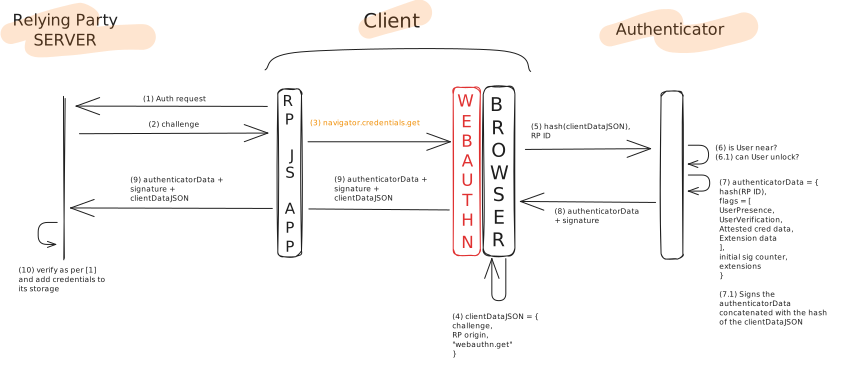
Here is the actual PublicKeyCredentialRequestOptions the server sends to initiate authentication (continuing our passkeys-debugger.io example with the same user):
{
    "publicKey": {
        // The credential ID from registration, so the authenticator knows which key to use
        "allowCredentials": [
            {
                "id": "MUr0XtSb_EOfcJuQ-zPHSAl9XbxEfXNr4ATHwnMY69s",
                "transports": [],
                "type": "public-key"
            }
        ],
        // Fresh nonce to prevent replay attacks
        "challenge": "XpWiPiZG3Kr_OzE31SBXMmbgOTkm5T_eNHeJ_oojAk8",
        // Must match the RP ID from registration
        "rpId": "www.passkeys-debugger.io",
        // Server demands biometric/PIN verification
        "userVerification": "required"
    }
}
Just like during registration, the Client assembles a clientDataJSON object. This time it contains the challenge, the RP origin, and the ceremony type "webauthn.get". The Client then hashes this clientDataJSON with SHA-256 and sends the hash along with the RP ID to the Authenticator over CTAP2.
The Authenticator verifies user proximity (BLE, NFC, or a physical touch) and, if required, user verification (PIN, biometric, or pattern). It then creates a CBOR-encoded authenticatorData object containing the RP ID hash, the flags, the signature counter, and any optional extensions. The Authenticator then uses the scoped private key (the one created during registration for this specific RP ID) to sign the concatenation of authenticatorData ‖ hash(clientDataJSON).
The Authenticator returns the signature and the authenticatorData to the Client, which appends the original clientDataJSON and forwards everything back to the Relying Party. The RP then verifies the data according to the WebAuthn specification and, if validated, lets the user sign in. No secrets ever cross the wire; the server only receives a cryptographic proof that the user still possesses the key.
Following our passkeys-debugger.io example, here is the full decoded assertion response returned by the Authenticator after a successful login:
{
    // Same credential ID from registration, confirming which key was used
    "id": "MUr0XtSb_EOfcJuQ-zPHSAl9XbxEfXNr4ATHwnMY69s",
    "rawId": "MUr0XtSb_EOfcJuQ-zPHSAl9XbxEfXNr4ATHwnMY69s",
    "type": "public-key",
    // "platform" = the device's built-in authenticator (TPM, Secure Enclave, etc.)
    "authenticatorAttachment": "platform",
    "response": {
        "authenticatorData": {
            // Same rpIdHash as registration, proving we're talking to the same RP
            "rpIdHash": "PpZrl-Wqt-OFfBpyy2SraN1m7LT0GZORwGA7-6ujYkM",
            "flags": {
                "userPresent": true,
                "userVerified": true,
                // No backup flags = device-bound credential
                "backupEligible": false,
                "backupStatus": false,
                // No attested data during authentication (key already exists)
                "attestedData": false,
                "extensionData": false
            },
            "counter": 0
        },
        "clientDataJSON": {
            // "webauthn.get" = this is the authentication ceremony
            "type": "webauthn.get",
            "challenge": "wjKggH9X76WaT1PxrO1YvbsHZtJ-a_gGUtys5kf-Ixk",
            // CRITICAL: written by the browser engine, not by JavaScript. This is the anti-phishing mechanism.
            "origin": "https://www.passkeys-debugger.io",
            "crossOrigin": false
        },
        // The authenticator's signature over authData ‖ SHA-256(clientDataJSON)
        "signature": "MEUCIBP_EhcFTBza3N0kyMVct8X_dzLNA8KXnjIi96Dukz4AAiEA54Ys5Z0bo-yktSh8d0JZUJ3GfdnehFAam-0UJbHD0nw",
        // The user handle from registration, allowing the server to identify the account
        "userHandle": "LFyre4RHSLprCSRuOwEyEvLvsBuCt-MKAN7QBjISlNs"
    }
}
A few things jump out when comparing this against the registration response:
- The
authenticatorDatais shorter: noaaguid, nocredentialId, no public key. TheattestedDataflag isfalsebecause the key already exists on the server. - The
clientDataJSONtype is"webauthn.get"instead of"webauthn.create". - The
signatureis the core proof: the Authenticator signedauthenticatorData ‖ SHA-256(clientDataJSON)with the private key scoped to this RP. The server verifies it using the stored public key.
The clientDataJSON deserves special attention. It's one of the anti-phishing mechanisms in concrete, machine-readable form. The browser populates the origin field automatically with the actual origin of the page making the request. If you set up a pixel-perfect phishing clone at g00gle.com and the victim initiates a passkey login from that page, the browser will dutifully write "origin": "https://g00gle.com" into the clientDataJSON. When the real Google server receives the assertion, it hashes the clientDataJSON (containing the wrong origin), verifies the signature over authData ‖ hash(clientDataJSON), and the math doesn't work out. The signature was made over data that included the legitimate origin hash. The attack dies right there, silently, at the verification step, no user awareness required.
This is the fundamental difference between passkeys and, say, a TOTP code: a TOTP code is origin-agnostic. You can type it into any website, real or fake, and it'll happily be accepted. A passkey assertion is cryptographically tied to a specific origin, making it physically impossible to replay on a different domain.
What's Next
With the ceremonies mapped out and authData parsed byte by byte, you can now read a passkey registration or authentication exchange straight off the wire.
The second blogpost, Under the Hood: The Architecture, picks up from there. It covers what makes passkeys architecturally distinct, the device-bound vs. synced split, the three authenticator categories, and the deployment quirks (magic links, key wrapping, signature counters) that practitioners actually run into. The third blogpost, Under Attack, is the offensive companion.
References
About the Author
 Matteo Giordano is a Security Engineer at Anvil Secure, focused on offensive engagements across AppSec and NetSec, with a recent specialty in AI Red Teaming and GenAI security.
He came into security from kernel-side development at rev.ng Labs, where he worked on a next-generation decompiler.